Top API theory
What is an API and what is it used for
An API (Application Programming Interface) is a set of rules and protocols that allows different software applications to communicate with each other. It defines the methods and data structures that developers can use to interact with external software components, operating systems, or microservices.
Data Access
APIs allow applications to access data or functionality from other applications or services. For example, a weather app may use a weather API to get the latest weather information.
Integration
APIs enable the integration of different systems and allow them to work together. For example, integrating a payment gateway like Stripe into an e-commerce platform.
Automation
APIs can automate tasks by enabling communication between different systems without human intervention. For example, automating the creation of support tickets when errors are detected in a system.
Extending Functionality
APIs allow third-party developers to extend the functionality of an application by adding plugins, integrations, or custom features.
What are HTTP methods and which ones are most commonly used in REST APIs
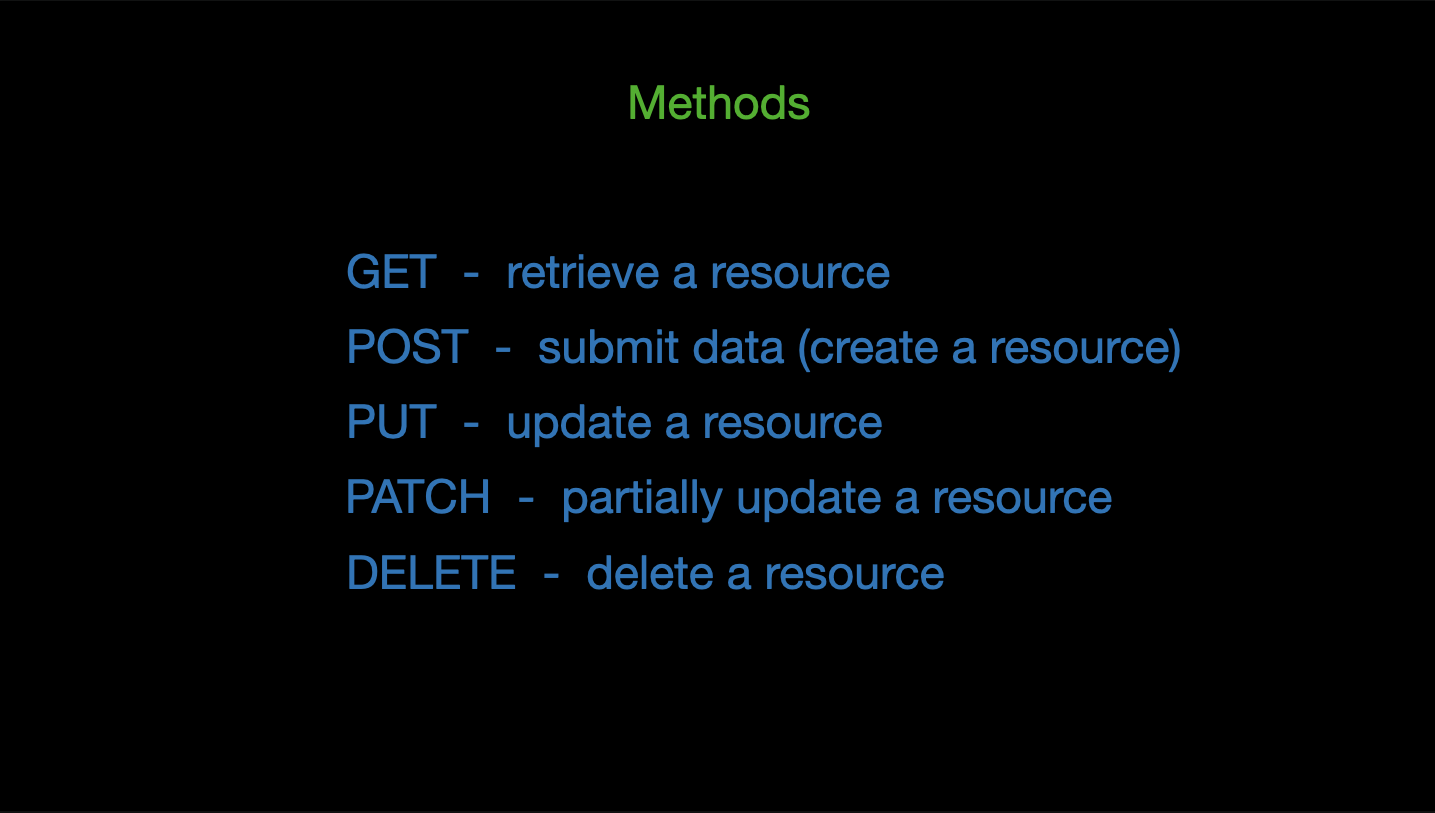
HTTP methods (also known as HTTP verbs) are a set of request methods supported by HTTP that indicate the desired action to be performed on the specified resource.
- GET: Used to retrieve data from a server at the specified resource. It should be safe, meaning it doesn’t alter the state of the resource.
Example: Fetching a list of users.
GET / api / users;
- POST: Used to submit data to the server to create a new resource. This method can change the state of the server.
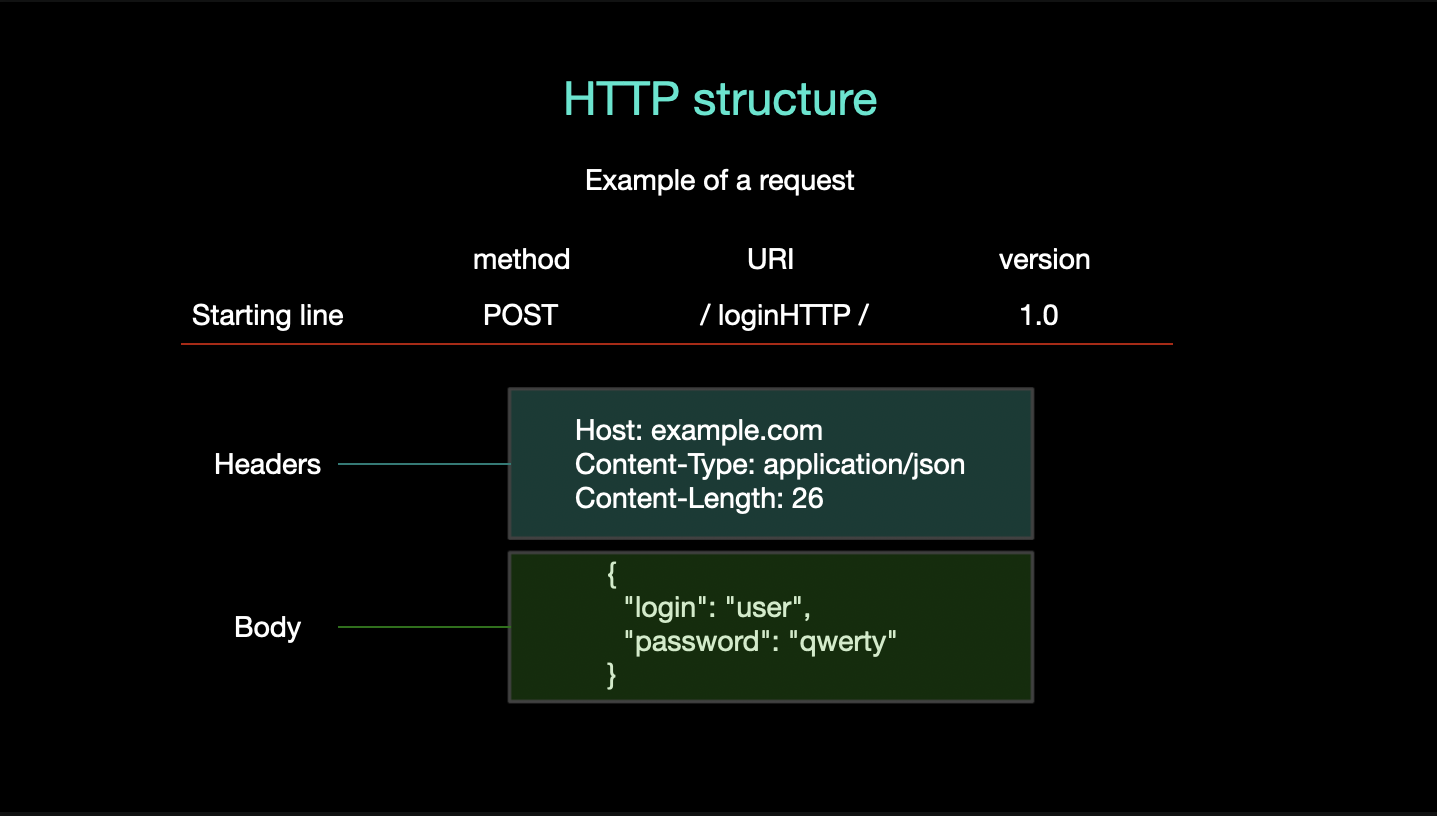
POST /api/users
Content-Type: application/json

{
  "name": "John Doe",
  "email": "john.doe@example.com"
}
- PUT: Used to update a current resource with new data. If the resource does not exist, PUT can create it.
PUT /api/users/1 Content-Type: application/json { "name": "John Doe Updated",
"email": "john.doe@example.com" }
- DELETE: Used to delete the specified resource from the server.
DELETE /api/users/1
- PATCH: Used to apply partial modifications to a resource. Unlike PUT, which requires a complete resource, PATCH only updates the specified fields.
PATCH /api/users/1 Content-Type: application/json { "email":
"new.email@example.com" }
- OPTIONS: Used to describe the communication options for the target resource, often used in CORS (Cross-Origin Resource Sharing) scenarios.
OPTIONS /api/users
What are HTTP status codes and which ones are most important to understand when working with APIs
HTTP status codes are standardized codes returned by the server in response to a client’s request. They indicate whether a request has been successfully completed or if there was an error, and provide information on what exactly happened.
Important HTTP Status Codes:
-
2xx Success: 200 OK: The request was successful, and the server returned the requested data.
201 Created: The request was successful, and a new resource was created as a result.
204 No Content: The request was successful, but there is no content to return (often used with DELETE operations). -
3xx Redirection:
301 Moved Permanently: The resource has been moved permanently to a new URL.
302 Found: The resource is temporarily located at a different URL.
304 Not Modified: The resource has not been modified since the last request, so the client can use the cached version. -
4xx Client Errors: 400 Bad Request: The request could not be understood by the server due to malformed syntax or invalid data.
401 Unauthorized: Authentication is required and has failed or has not been provided.
403 Forbidden: The server understands the request but refuses to authorize it.
404 Not Found: The server could not find the requested resource.
405 Method Not Allowed: The method specified in the request is not allowed for the resource. -
5xx Server Errors: 500 Internal Server Error: The server encountered an unexpected condition that prevented it from fulfilling the request.
502 Bad Gateway: The server received an invalid response from an upstream server while acting as a gateway or proxy.
503 Service Unavailable: The server is currently unavailable (overloaded or down for maintenance).
Understanding these status codes is crucial for debugging and handling responses in APIs.
How do you implement authentication and authorization in an API What methods do you know
Authentication and authorization are key concepts in securing APIs.
Authentication
Authentication verifies the identity of a user or service trying to access an API.
Basic Authentication: Transmits user credentials (username and password) as a base64 encoded string in the Authorization header. This method is simple but less secure.
Token-Based Authentication: Users receive a token (often JWT - JSON Web Token) upon successful login, which they include in the Authorization header for subsequent requests.
OAuth 2.0: A widely used authorization framework that allows third-party services to exchange access tokens to interact with an API on behalf of the user.
API Keys: A unique key assigned to each client, included in the request headers or as a query parameter. It’s a simple way to authenticate but does not provide user-level granularity.
Authorization
Authorization determines what resources a user or service is allowed to access after authentication.
Role-Based Access Control (RBAC): Permissions are assigned based on the user's role. For example, an admin might have access to all endpoints, while a regular user has limited access.
Attribute-Based Access Control (ABAC): Uses attributes (e.g., user, resource, environment) to determine access rights. This method is more flexible than RBAC.
Example using JWT Authentication
User logs in and receives a JWT.
Client includes the JWT in the Authorization header for subsequent API requests.
Server verifies the JWT and grants access based on the token's claims (e.g., user ID, roles).
Authorization: Bearer <JWT></JWT>
What is a REST API and what are its main principles (RESTful principles)
A REST API (Representational State Transfer API) is an architectural style for designing networked applications. It uses HTTP requests to perform CRUD (Create, Read, Update, Delete) operations on resources.
Statelessness
Each request from a client to the server must contain all the information the server needs to fulfill that request. The server does not store client context between requests.
Client-Server Architecture
The client and server operate independently, and the only interaction between them is through requests and responses.
Uniform Interface
A consistent and standardized interface between client and server, typically using standard HTTP methods and status codes.
Resource-Based
Everything is considered a resource, identified by URIs (Uniform Resource Identifiers).
Representations
Resources can be represented in different formats, commonly JSON or XML.
Layered System
A REST API can be layered, meaning intermediaries like caches or proxies can be introduced between the client and server.
Cacheability
Responses must define themselves as cacheable or non-cacheable to improve efficiency and performance by reusing cached responses.
How do you structure routes (endpoints) in a REST API Provide examples
Structuring routes (endpoints) in a REST API involves organizing the URLs to represent resources and their relationships clearly and logically.
- Use Nouns for Resources: Routes should represent resources, and not actions. Use nouns like users, posts, and orders.
GET /api/users // Fetch all users POST /api/users // Create a new user
- Use HTTP Methods to Indicate Actions: Different HTTP methods should be used to perform different actions on the same resource.
GET /api/users/1 // Fetch user with ID 1 PUT /api/users/1 // Update user with ID
1 DELETE /api/users/1 // Delete user with ID 1
- Hierarchical Structure: Reflect the resource hierarchy in your routes.
GET /api/users/1/posts // Fetch all posts for user with ID 1 POST
/api/users/1/posts // Create a new post for user with ID 1
- Use Query Parameters for Filtering, Sorting, and Pagination: Keep the base URL clean and use query parameters for additional options.
GET /api/posts?sort=desc&limit=10
- Versioning: Include versioning in the route to maintain backward compatibility when the API evolves.
GET /v1/api/users
- Plural vs. Singular: Stick with plural nouns for collections and singular nouns for individual resources.
GET /api/orders // Fetch all orders GET /api/orders/123 // Fetch order with ID
123
How do you handle and return errors in a REST API Provide examples
Handling and returning errors in a REST API is crucial for communicating issues clearly to the client. Proper error handling also helps in debugging and provides a better user experience. Best Practices for Error Handling:
- Use HTTP Status Codes: Return appropriate HTTP status codes for different types of errors.
400 Bad Request: The request is malformed or contains invalid data.
401 Unauthorized: Authentication is required or failed.
403 Forbidden: The client does not have permission to access the resource.
404 Not Found: The requested resource could not be found.
500 Internal Server Error: An unexpected error occurred on the server. - Return Error Messages in Response Body: Provide a JSON object with details about the error, including an error message and possibly an error code.
{
  "error": {
    "code": 400,
    "message": "Invalid request. 'email' is required."
  }
}
- Log Errors: Log errors on the server side for debugging and monitoring purposes.
- Use Standard Error Format: Maintain a consistent format for error responses across the API.
{
  "error": {
    "code": 404,
    "message": "Resource not found."
  }
}
- Graceful Degradation: In case of partial failures (e.g., failing to update one of many resources), return information about what succeeded and what failed.
GET /api/users/999
HTTP/1.1 404 Not Found
Content-Type: application/json

{
  "error": {
    "code": 404,
    "message": "User with ID 999 not found."
  }
}
What is idempotency and why is it important for REST APIs
Idempotency in REST APIs means that making the same request multiple times will result in the same outcome without causing side effects. This is particularly important for methods like PUT, DELETE, and PATCH, where the operation should not produce unintended consequences if repeated.
Importance:
Safety: Ensures that repeating a request (e.g., due to network issues or retries) does not lead to unintended actions such as duplicating records or unintended deletions.
Consistency: Helps maintain consistent data state even when multiple identical requests are made.
Predictability: Provides predictable and reliable behavior in distributed systems, especially when retry mechanisms are in place.
PUT /api/users/1
Content-Type: application/json

{
  "name": "John Doe"
}
If this request is sent multiple times, the user with ID 1 will consistently have the name "John Doe" set, without creating multiple users or unintended changes.
What is GraphQL and how does it work
GraphQL is a query language for APIs that allows clients to request exactly the data they need and nothing more. It provides a more flexible and efficient alternative to REST by allowing clients to specify the structure of the response.
How GraphQL Works:
- Single Endpoint: Unlike REST, which has multiple endpoints for different resources, GraphQL operates on a single endpoint.
- Queries and Mutations: Queries: Used to fetch data from the server. Mutations: Used to modify data on the server (e.g., create, update, delete).
- Schema: The GraphQL server defines a schema that specifies the types of data available and how they can be queried or mutated.
- Resolvers: Functions that resolve the data for the fields in the schema. They fetch the data requested by the client.
- Introspection: Clients can query the schema itself to understand what queries and mutations are available.
query {
  user(id: "1") {
    name
    email
  }
}
This query requests the name and email of the user with ID "1".
What are the main components of a GraphQL schema
A GraphQL schema defines the structure of the data available through the GraphQL API. It specifies what types of data clients can query and mutate, and how these operations are performed.
- Types: Define the shape of data. Common types include Query, Mutation, and custom object types.
type User {
  id: ID!
  name: String!
  email: String!
}
- Queries: Define how clients can fetch data. Each query corresponds to a function on the server that retrieves the data.
type Query {
  user(id: ID!): User
  users: [User]
}
- Mutations: Define how clients can modify data. Each mutation corresponds to a function that performs a create, update, or delete operation.
type Mutation {
  createUser(name: String!, email: String!): User
  updateUser(id: ID!, name: String, email: String): User
}
- Resolvers: Functions that resolve the queries and mutations by fetching or modifying data. They link the schema with the actual data sources.
- Enums: Define a set of possible values for a field, providing a way to limit inputs to predefined values.
enum Role {
  ADMIN
  USER
  GUEST
}
- Input Types: Define the shape of data sent to mutations or queries that require complex input objects.
input CreateUserInput {
  name: String!
  email: String!
}
- Interfaces and Unions: Provide mechanisms for defining polymorphic types, allowing fields to return different types under a common interface or union.
How do you create queries and mutations in GraphQL
Queries and Mutations in GraphQL allow you to fetch and modify data, respectively.
- Creating Queries:
Define the Query in the Schema:
Specify the type of data that can be requested and any required arguments.
type Query {
  user(id: ID!): User
  users: [User]
}
Write the Query on the Client: Use the defined schema to write a query that fetches the desired data.
query {
  user(id: "1") {
    name
    email
  }
}
Execute the Query:
Send the query to the GraphQL server, which resolves it using the appropriate resolvers and returns the requested data.
- Creating Mutations
Define the Mutation in the Schema:
Specify the type of data that can be modified and any required input.
type Mutation {
  createUser(name: String!, email: String!): User
  updateUser(id: ID!, name: String, email: String): User
}
Write the Mutation on the Client:
Use the defined schema to write a mutation that modifies the data.
mutation {
  createUser(name: "John Doe", email: "john.doe@example.com") {
    id
    name
  }
}
- Execute the Mutation
Send the mutation to the GraphQL server, which performs the modification and returns the modified data.
What are resolvers in GraphQL and how do they work
Resolvers are functions in GraphQL that resolve the values of the fields in the schema. They are the bridge between the schema and the actual data sources (e.g., databases, APIs).
How Resolvers Work:
Function Signature: A resolver function receives four arguments:
- parent: The previous object, useful for nested resolvers.
- args: The arguments passed to the query or mutation.
- context: An object shared across all resolvers, useful for authentication, data sources, etc.
- info: Information about the execution state of the query.
Fetching Data: The resolver fetches the required data, either from a database, another API, or any other source.
Returning Data: The resolver returns the data in the format specified by the schema.
const resolvers = {
  Query: {
    user: (parent, args, context, info) => {
      return context.db.getUserById(args.id);
    },
    users: (parent, args, context, info) => {
      return context.db.getAllUsers();
    },
  },
  Mutation: {
    createUser: (parent, args, context, info) => {
      return context.db.createUser({ name: args.name, email: args.email });
    },
  },
};
In this example, the user query resolver fetches a user by ID, and the createUser mutation resolver creates a new user in the database.
What are fragments in GraphQL and how do you use them
Fragments in GraphQL allow you to reuse parts of queries or mutations. They enable you to define a set of fields that can be reused across different queries or mutations, reducing redundancy and improving maintainability.
- Define a Fragment: Specify the fields you want to reuse, and give the fragment a name.
fragment UserFields on User {
  id
  name
  email
}
- Use the Fragment in a Query or Mutation:
Reference the fragment within your query or mutation.
query {
  user(id: "1") {
    ...UserFields
  }
  users {
    ...UserFields
  }
}

fragment UserFields on User {
  id
  name
  email
}
Fragments are especially useful when you have multiple queries or mutations that require the same set of fields, allowing you to write more concise and maintainable code.
What is Idempotence?
Idempotence refers to an operation that can be performed multiple times without changing the result beyond the initial application. In other words, regardless of how many times the operation is executed, the outcome will remain the same as if it had been executed just once.
Key Points:
- Same result after multiple executions: An idempotent operation will always produce the same result, even if it's called repeatedly.
- No unintended side effects: Repeated executions do not cause unintended consequences or changes to the system state beyond what the first execution did.
Example in HTTP:
- GET: The HTTP
GETmethod is idempotent because retrieving the same resource multiple times doesn’t alter the resource itself. - PUT: The HTTP
PUTmethod is also idempotent because updating a resource with the same data multiple times will have the same effect as updating it once.
Non-Idempotent Example:
- POST: The HTTP
POSTmethod is not idempotent because sending the same request multiple times can result in multiple resource creations (e.g., creating new entries in a database).
Why Idempotence Matters:
- Reliability: In distributed systems, where network errors or retries may cause operations to be executed multiple times, idempotence ensures that the system remains consistent and avoids unintended side effects.