Top JS Theory
Explain phases during the javascript execution process
JavaScript, though often referred to as an interpreted language, actually undergoes a two-phase process during execution: the Creation Phase and the Execution Phase. These phases are crucial for understanding how JavaScript code is processed and executed. Let's break down each phase:
Creation Phase
During the Creation Phase, the JavaScript engine sets up the environment for the execution of the code. This includes:
-
Global Lexical Environment Creation:
- Global Environment Record: The JavaScript engine creates a global lexical environment where all the variables, functions, and imports in the global scope are registered.
- Object Environment Record: For functions declared using
function, their memory is allocated and they are fully initialized. This means that the functionfoo()is already ready to be used during this phase. - Declarative Environment Record: Variables declared with
const,let, andvarare also allocated memory but are set to an uninitialized state forconstandlet, whilevarvariables are initialized withundefined.
-
Import Statement Handling: The import statements, like
import someLib from './someLib';, are resolved, and the necessary modules are imported into the environment.
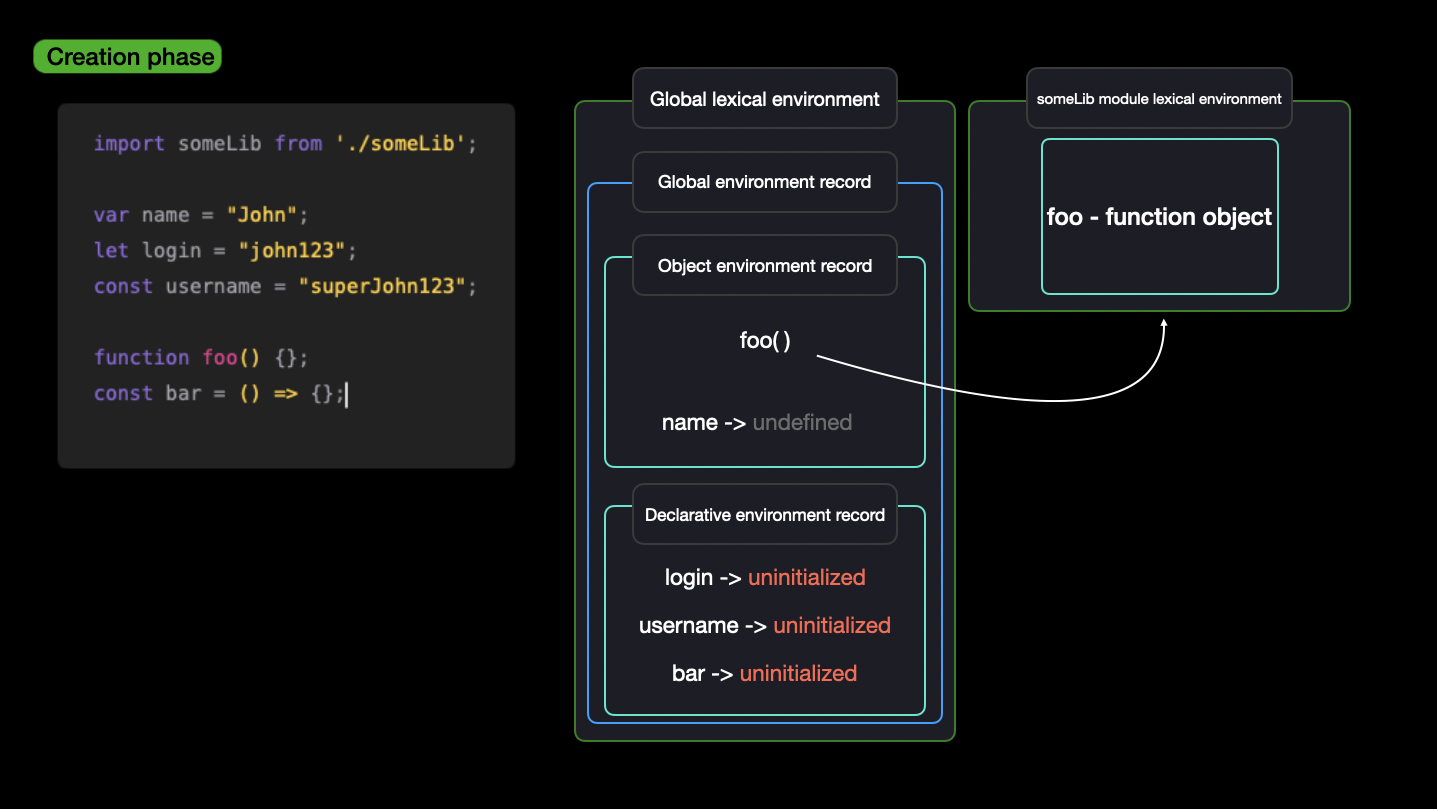
This phase sets up all the necessary bindings and memory allocations but doesn't yet execute any code except the imports.
Execution Phase
During the Execution Phase, the JavaScript engine starts executing the code line by line. This involves:
-
Variable Initialization:
var name = "John";initializes thenamevariable and assigns it the value"John".let login = "john123";initializes theloginvariable and assigns it the value"john123".const username = "superJohn123";initializes theusernamevariable and assigns it the value"superJohn123".
-
Function and Arrow Function Creation:
- The function
foo()is created and added to the Global Lexical Environment as a function object. - The arrow function
baris created and added to the Global Lexical Environment as a function object.
- The function
-
Module Import Execution:
- The imported
someLibmodule is also executed, creating its own lexical environment, and any exported functions or variables are made available for use.
- The imported
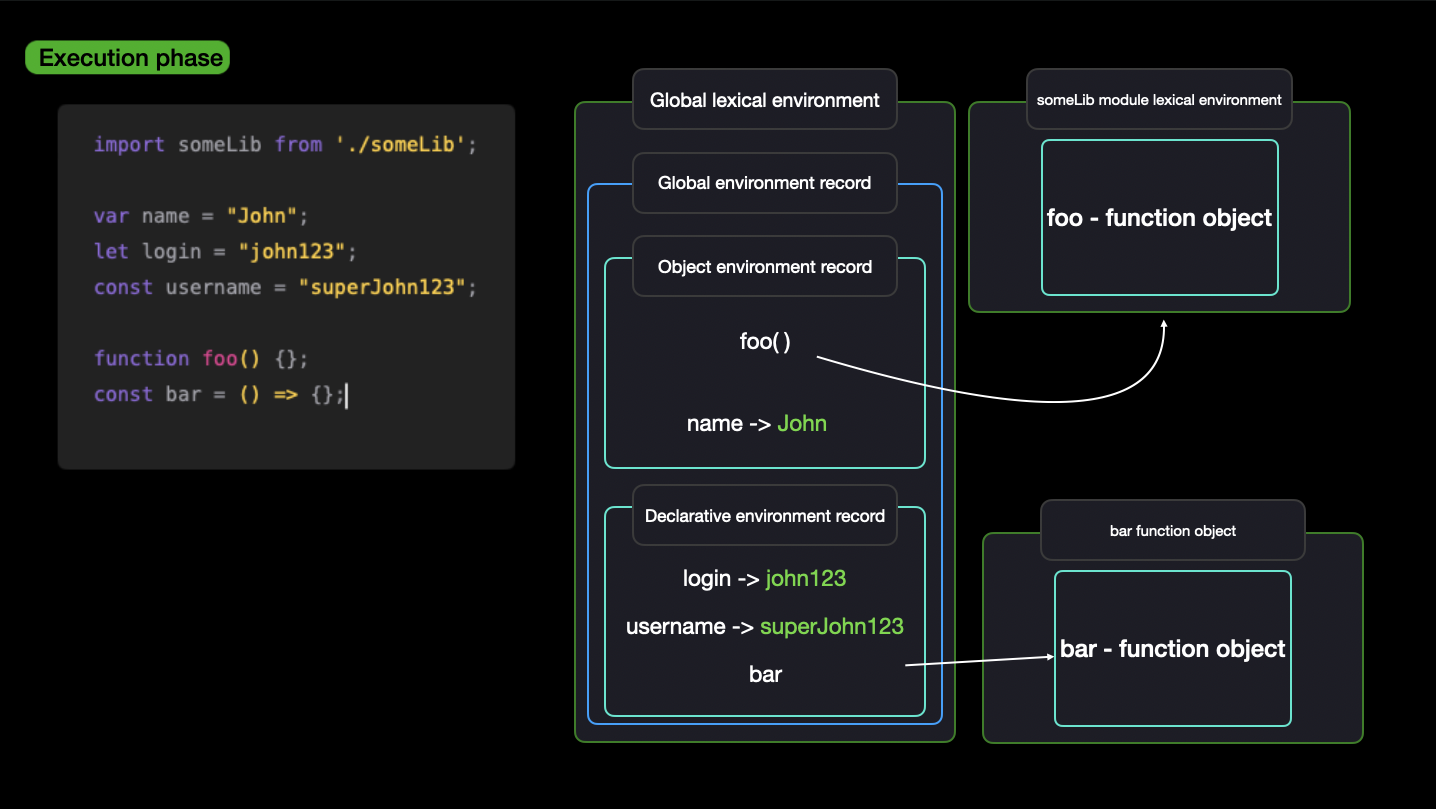
This phase allows the JavaScript engine to process and execute the code based on the environment setup during the Creation Phase.
Explain Hoisting in javascript
Hoisting is a JavaScript mechanism where variables and function declarations are moved to the top of their scope before code execution. This means that you can use functions and variables before they are declared in the code.
console.log(myVar); // undefined
var myVar = 5;
In this example, myVar is hoisted to the top of its scope, but its initialization (= 5) is not. Therefore, the output is undefined.
hoistedFunction(); // "Hello"
function hoistedFunction() {
  console.log("Hello");
}
However, function expressions are not hoisted in the same way:
notHoisted(); // TypeError: notHoisted is not a function
var notHoisted = function () {
  console.log("Hello");
};
How JS rendering in the browser
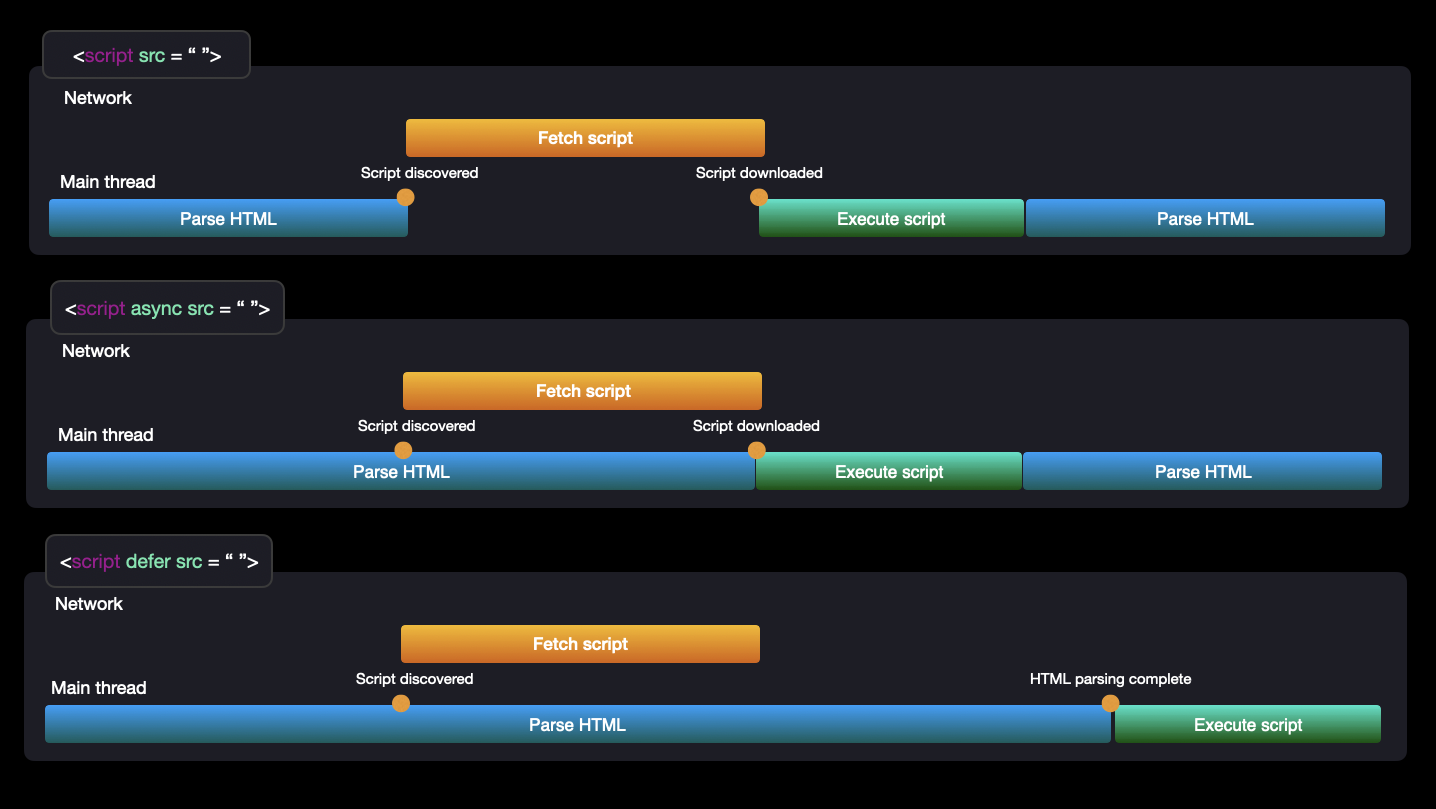
JavaScript rendering in the browser involves several key steps:
HTML Parsing: The browser starts by loading the HTML document and building the DOM (Document Object Model) tree.
CSS Parsing: Concurrently, the browser loads and parses the CSS, building the CSSOM (CSS Object Model).
Render Tree Construction: The browser combines the DOM and CSSOM to create the render tree, which represents the visible parts of the page.
Layout: The browser calculates the layout, determining the size and position of each element.
Painting: Finally, the browser paints the pixels on the screen, rendering the page.
JavaScript Execution: If JavaScript is present, it can manipulate the DOM and CSSOM, potentially triggering a re-render (repaint and reflow).
What are closures
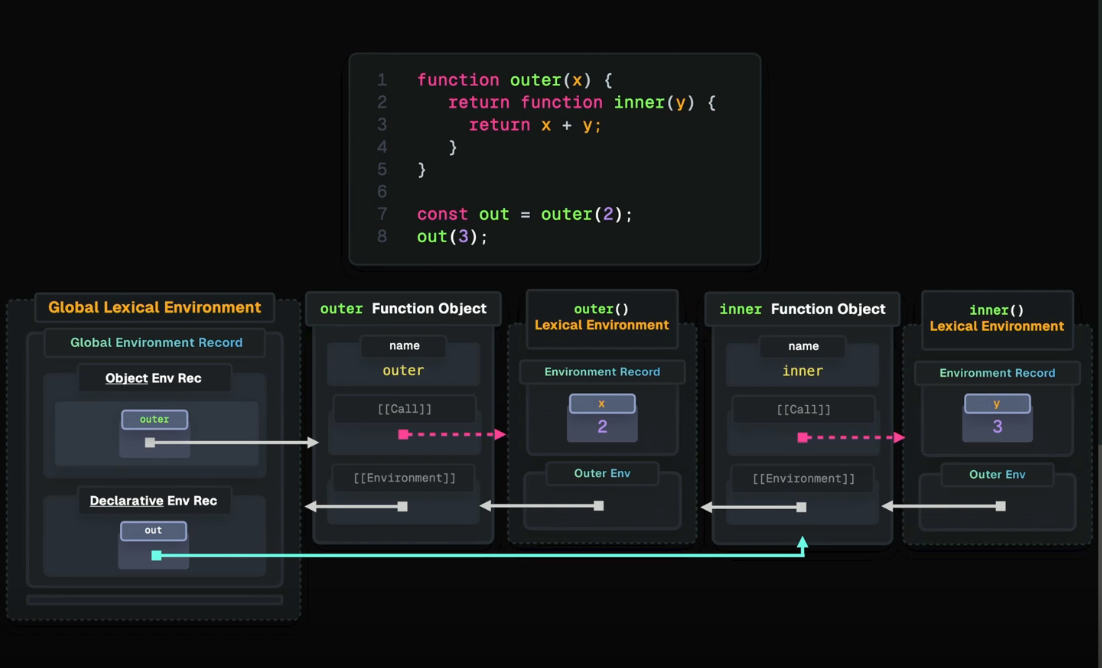
A closure in JavaScript is a function that remembers its lexical scope even when the function is executed outside that scope. Closures are created whenever a function is defined inside another function, allowing the inner function to access the variables of the outer function.
function outerFunction() {
  let outerVar = "I am outside!";
  function innerFunction() {
    console.log(outerVar);
  }
  return innerFunction;
}

const inner = outerFunction();
inner(); // logs "I am outside!"
Here, innerFunction forms a closure, retaining access to outerVar even after outerFunction has finished executing.
What are Promises
Promises in JavaScript are objects that represent the eventual completion (or failure) of an asynchronous operation and its resulting value. A promise can be in one of three states:
Pending: Initial state, neither fulfilled nor rejected.
Fulfilled: Operation completed successfully.
Rejected: Operation failed.
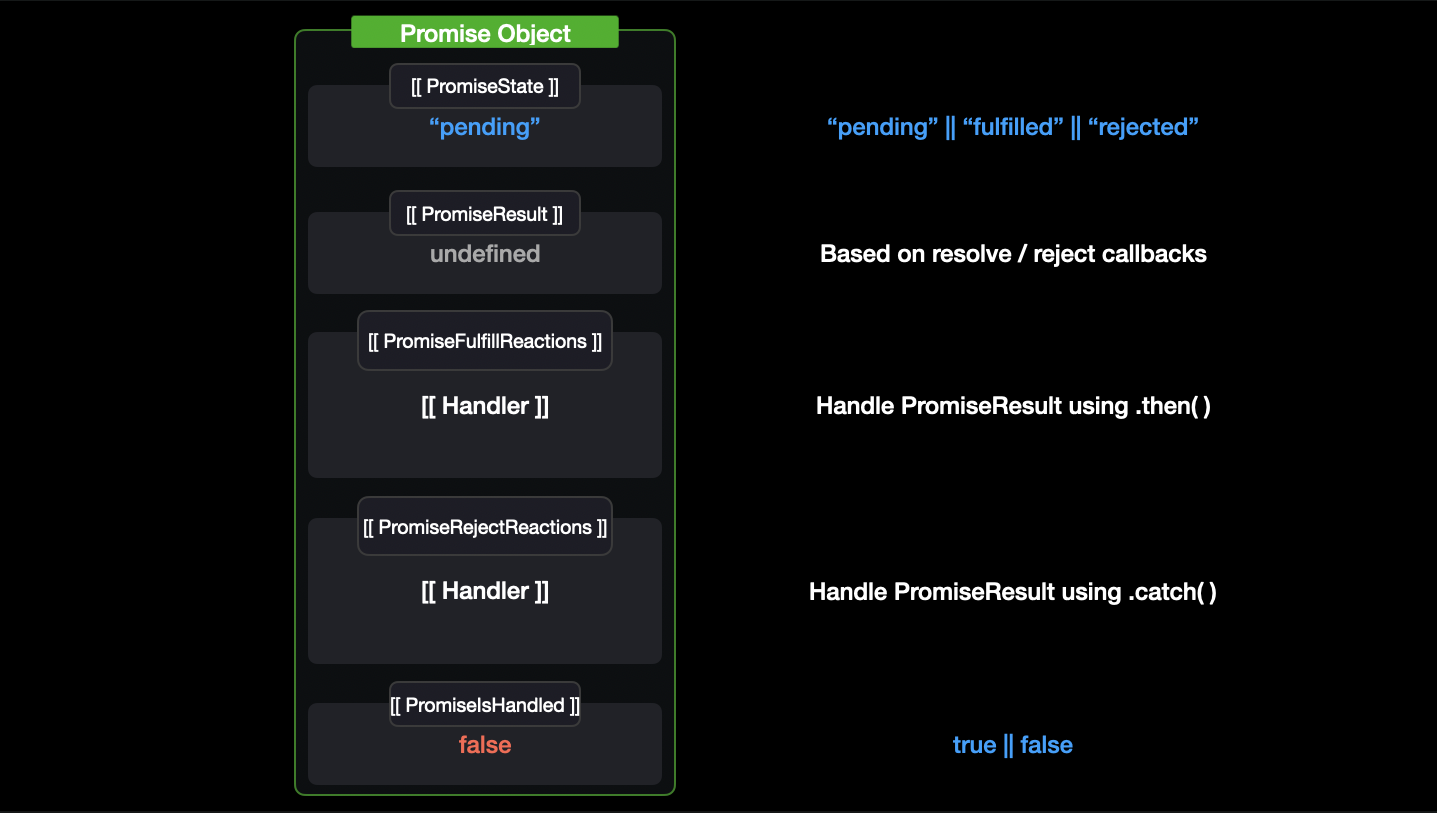
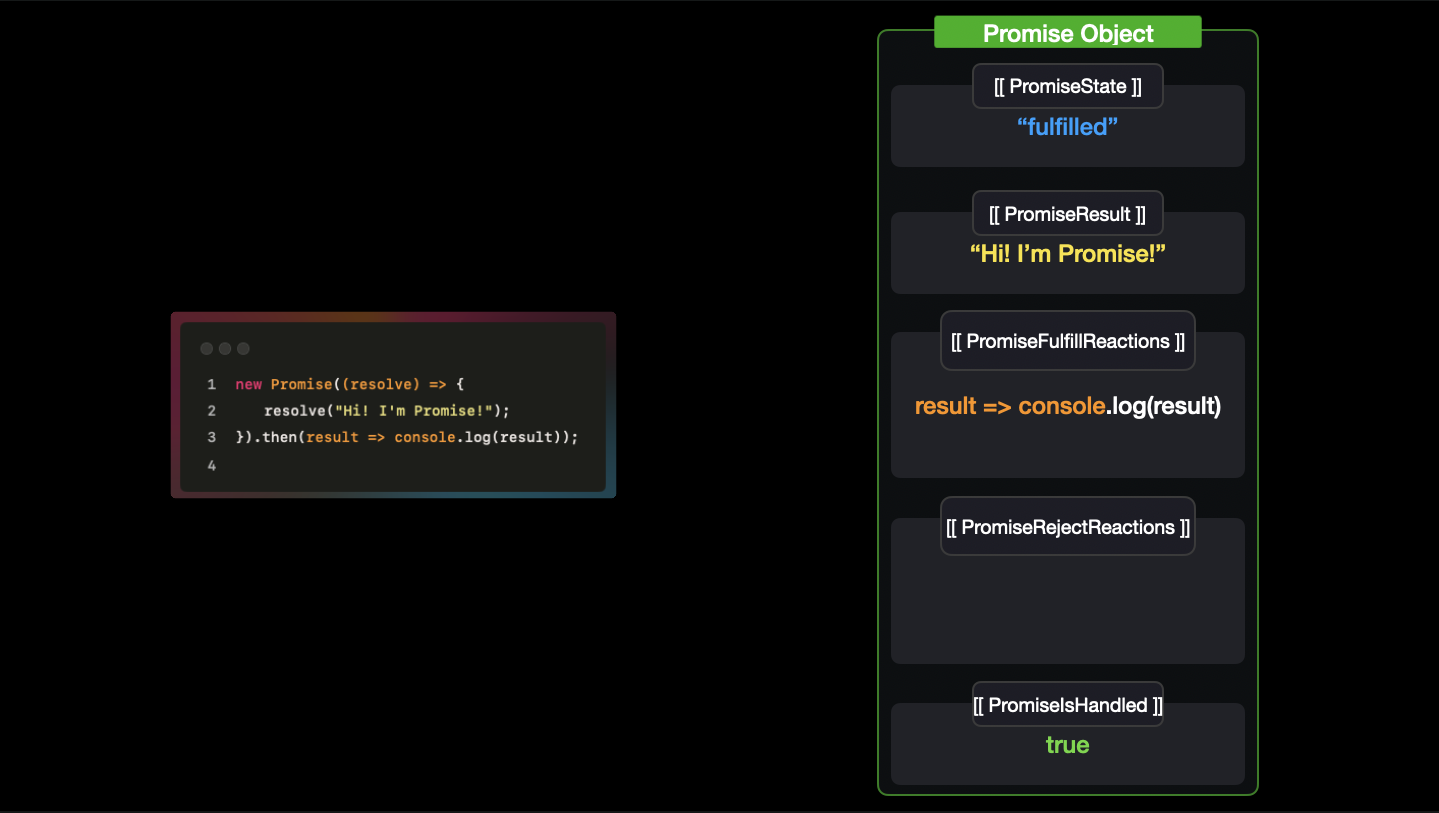
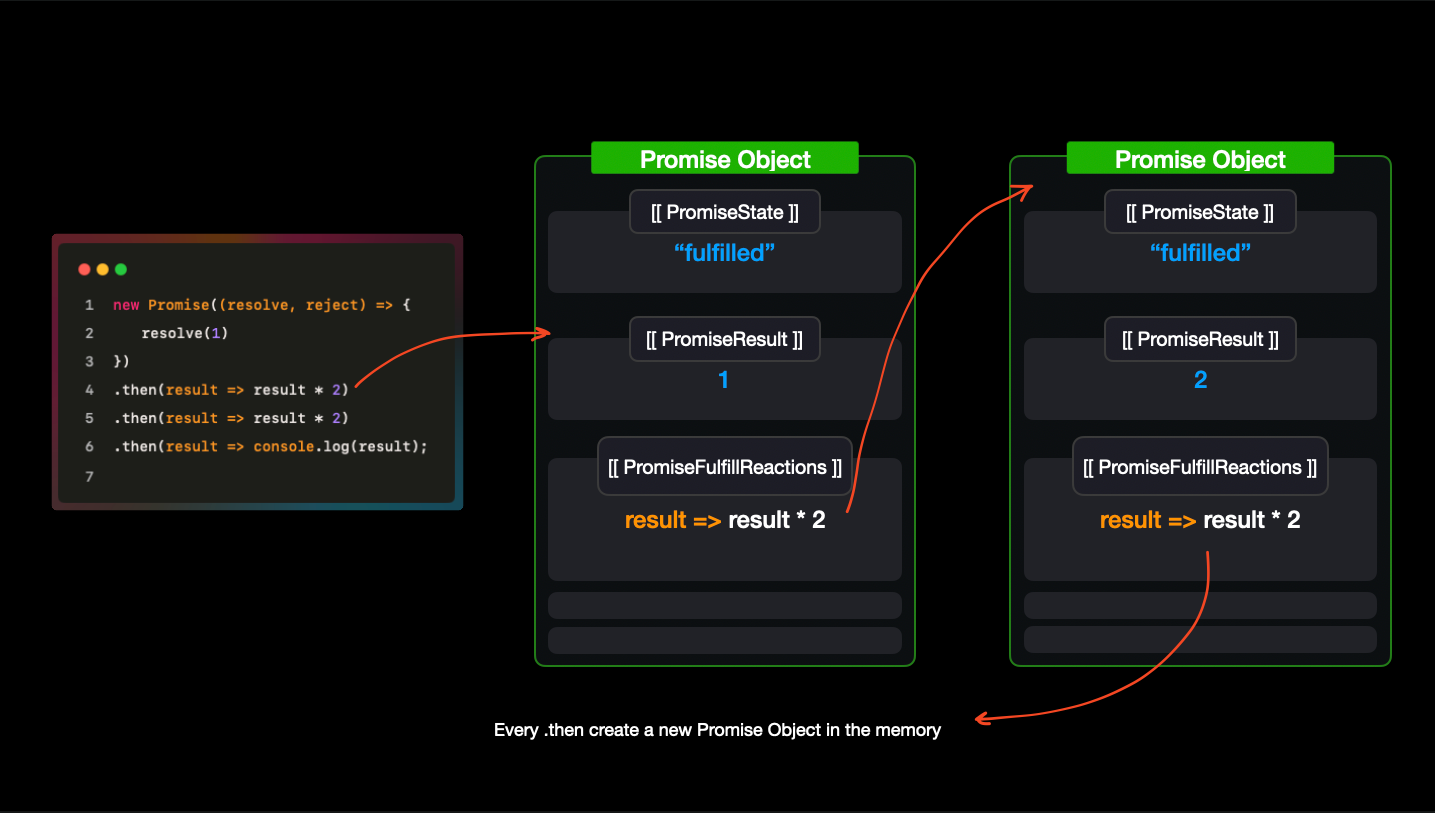
let promise = new Promise((resolve, reject) => {
  // Asynchronous operation
  let success = true;
  if (success) {
    resolve("Operation succeeded");
  } else {
    reject("Operation failed");
  }
});

promise
  .then((message) => {
    console.log(message);
  })
  .catch((error) => {
    console.error(error);
  });
In this example, depending on whether the operation succeeds or fails, then or catch will handle the resolved or rejected value respectively.
What are object prototypes
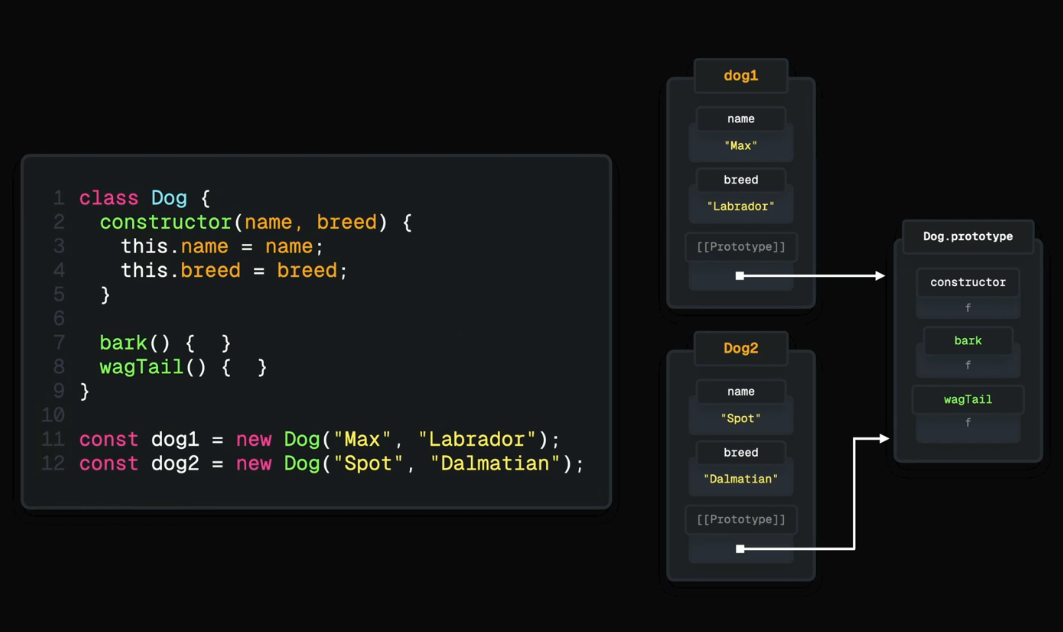
In JavaScript, every object has an internal property called [[Prototype]] that points to another object. This is called the prototype. A prototype is an object from which other objects inherit properties and methods. When trying to access a property on an object, JavaScript first looks for the property on the object itself. If it is not found, it looks up the prototype chain until it finds the property or reaches the end of the chain (i.e., null).
let person = {
  greet() {
    console.log("Hello!");
  },
};

let student = Object.create(person);
student.study = function () {
  console.log("Studying...");
};

student.greet(); // "Hello!" (inherited from person)
Here, student inherits the greet method from its prototype person.
What are callbacks? Difference between callback and promise
Callbacks are functions passed as arguments to other functions and are executed after the completion of certain tasks. Callbacks are commonly used for handling asynchronous operations.
function fetchData(callback) {
  setTimeout(() => {
    callback("Data fetched!");
  }, 1000);
}

fetchData((message) => {
  console.log(message);
});
Promises provide a more robust way to handle asynchronous operations compared to callbacks. Promises can be chained using .then() and .catch() for error handling, making the code more readable and maintainable.
Difference between Callback and Promise:
Callback: Uses a function passed as an argument to handle asynchronous tasks. Can lead to callback hell if nested deeply.
Promise: Represents the future result of an asynchronous operation. Provides better readability and avoids callback hell.
What are the types of errors in javascript
Syntax Errors: Occur when the code contains incorrect syntax. These errors prevent the code from running..
let x = ; // SyntaxError: Unexpected token ;

Reference Errors: Occur when trying to access a variable that does not exist or is not initialized.
console.log(y); // ReferenceError: y is not defined

Type Errors: Occur when a value is not of the expected type.
let num = 5;
num.toUpperCase(); // TypeError: num.toUpperCase is not a function

Range Errors: Occur when a value is not within an acceptable range.
let arr = new Array(-1); // RangeError: Invalid array length

Eval Errors: Related to the eval() function. These are rare and mainly apply to cases where the eval() function is used incorrectly.
Event Bubbling and Stopping Propagation in JavaScript
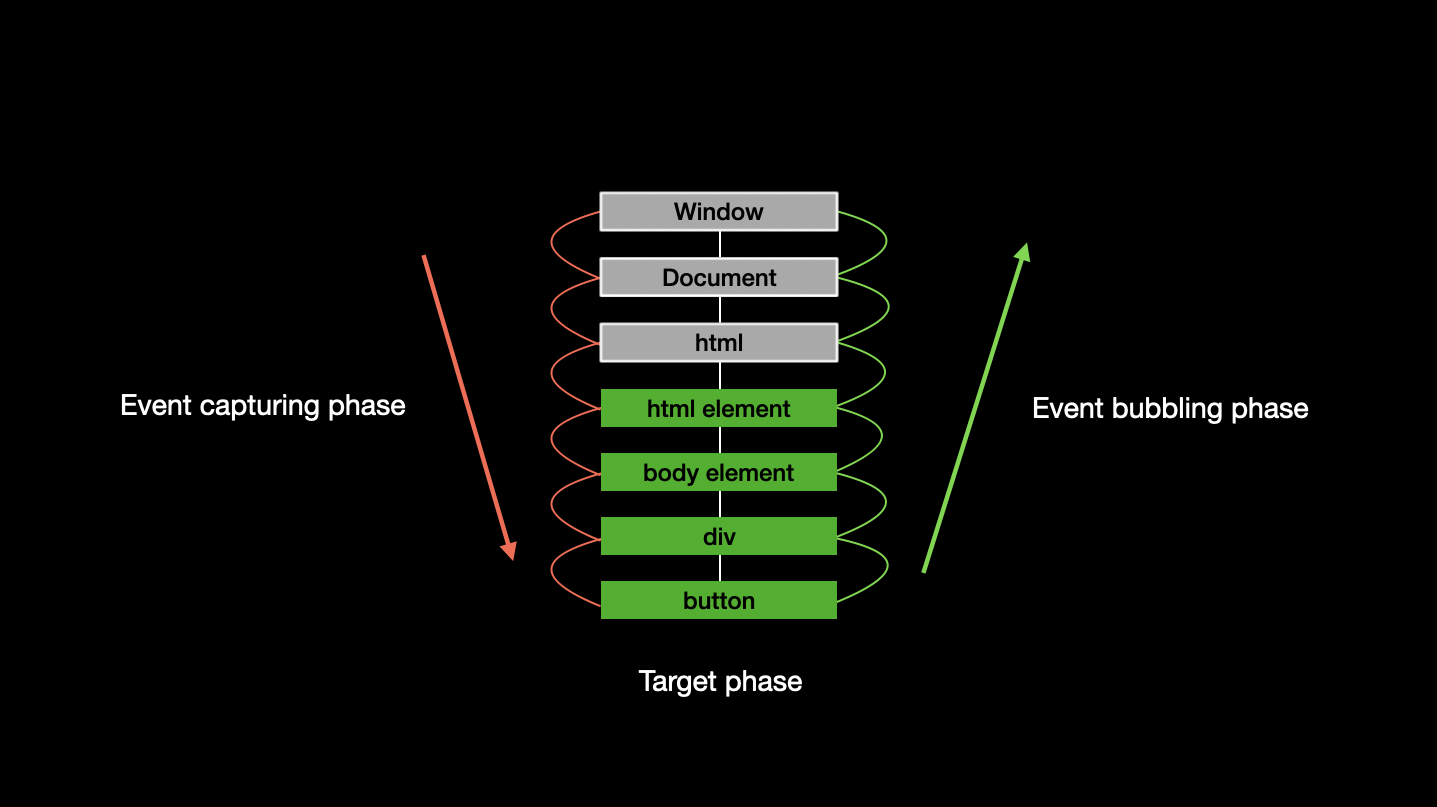
Event Bubbling is the process where an event starts from the deepest target element and propagates up to the root of the DOM tree. For example, if you click on a button inside a div, the click event first triggers on the button, then bubbles up to the div, and then to the document.
Stopping Propagation can be done using the event.stopPropagation() method. This method stops the event from bubbling up the DOM tree.
document.getElementById("child").addEventListener("click", function (event) {
  event.stopPropagation();
  console.log("Child clicked");
});

document.getElementById("parent").addEventListener("click", function () {
  console.log("Parent clicked");
});
Stopping event propagation (event.stopPropagation()) can be useful in various situations
Preventing Unwanted Actions When you have several elements associated with the same event type (e.g., click), and you want the event to be handled only by a specific element without being passed on to others. For example, if you have a button inside a modal window, and clicking it triggers a click event on the modal background, closing the modal window, you can use event.stopPropagation() to prevent this.
Isolating Event Logic In some cases, you want an event handler to apply only to a specific element without affecting its parent elements or elements higher up in the DOM tree. This helps isolate event logic and prevent potential conflicts.
Improving Performance Stopping event propagation can help reduce the number of event handler calls, which can be important in high-load applications or those with complex DOM structures.
If the event handler is directly on the button, such as using onClick in React, and you call event.stopPropagation() inside that handler, the event will be handled only at that level and will not propagate up the DOM tree.
As a result, any click handlers assigned to the button's parent elements will not be triggered.
When you stop event propagation using event.stopPropagation(), elements higher in the DOM tree, even if they are "listening" for the event, will not be notified because the event won't reach them.
However, if you have another notification mechanism, like using the Observer pattern, you can notify other components or elements without relying on event bubbling. For example, you can call a function that will notify other elements or handle logic independently of the event propagation.
What do you mean by DOM
The DOM is an interface that represents the structure of an HTML or XML document as a tree of objects.
- Each node in this tree is an object that corresponds to a part of the document (such as elements, attributes, text content, etc.).
- JavaScript can interact with the DOM to dynamically change the content, structure, and style of a webpage.
// Accessing an element by its ID
const element = document.getElementById("myElement");

// Changing the text content of the element
element.textContent = "New content";

// Modifying the style of the element
element.style.color = "blue";

// Adding a new element to the DOM
const newElement = document.createElement("div");
newElement.textContent = "I'm a new div!";
document.body.appendChild(newElement);
Explain Scope and Scope Chain in javascript
Scope in JavaScript defines the accessibility of variables and functions.
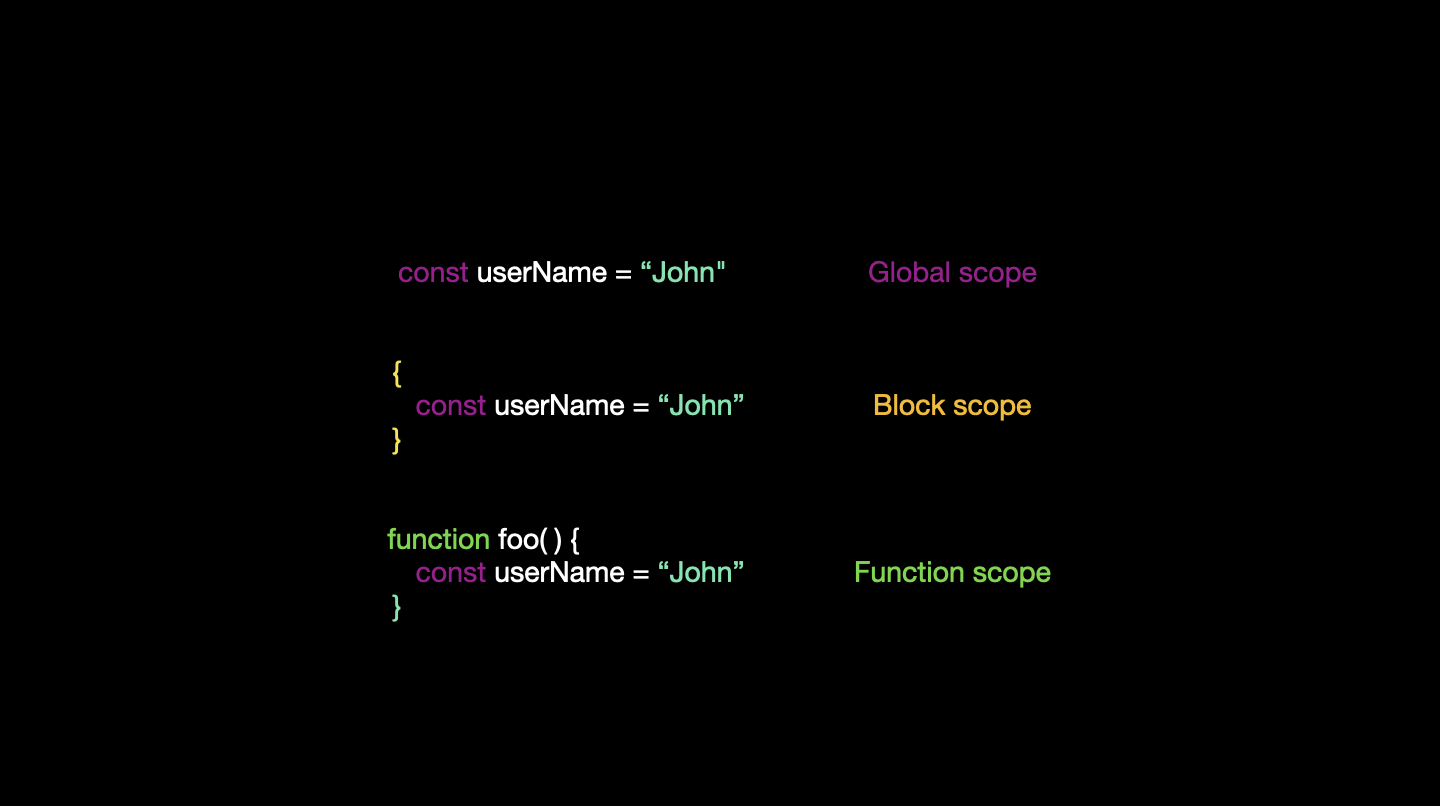
JavaScript has three types of scopes.
- The global scope refers to variables declared outside any function or block, making them accessible from anywhere in the code.
- The block scope refers to variables declared within a block (using let or const), which are only accessible within that block.
- The local scope (or function scope) refers to variables declared within a function, which are only accessible within that function.
The scope chain refers to the order in which the JavaScript engine searches for variables.
When a variable is used, JavaScript starts looking for it in the current scope and moves up to the outer scope, continuing this process until it reaches the global scope or the variable is not found.
What are Generators
Generators are special functions in JavaScript that can pause execution and later resume it. They are defined using the function* syntax and yield values one at a time using the yield keyword.
function* generatorFunction() {
  yield "First";
  yield "Second";
  yield "Third";
}

const gen = generatorFunction();
console.log(gen.next().value); // "First"
console.log(gen.next().value); // "Second"
console.log(gen.next().value); // "Third"
Explain “this” keyword
The this keyword in JavaScript refers to the object that is currently executing the code. Its value depends on where it is used:
In a method, this refers to the object that owns the method.
In a function (non-strict mode), this refers to the global object (or undefined in strict mode).
In an event handler, this refers to the element that received the event.
With call, apply, and bind, this can be explicitly set.
// 1. In the global context (or outside of any function), "this" refers to the global object.
// In a browser, this is typically the "window" object.
console.log(this); // window (in a browser)

// 2. Inside a method (a function inside an object), "this" refers to the object that owns the method.
const obj = {
  name: "Object",
  getName: function () {
    return this.name; // "this" refers to obj
  },
};
console.log(obj.getName()); // "Object"

// 3. In a regular function (not a method), "this" refers to the global object (window in browsers).
// In strict mode, "this" will be undefined.
function show() {
  console.log(this);
}
show(); // window (in non-strict mode), undefined (in strict mode)

// 4. In an event handler, "this" refers to the element that received the event.
const button = document.querySelector("button");
button.addEventListener("click", function () {
  console.log(this); // "this" refers to the button element
});

// 5. In an arrow function, "this" retains the value of the enclosing context's "this" (lexical scoping).
const arrowFunction = () => {
  console.log(this); // "this" refers to the context where the arrow function was defined
};
arrowFunction(); // The value depends on where the arrow function is defined

// 6. Using "call", "apply", or "bind", you can explicitly set the value of "this".
function sayHello() {
  console.log("Hello, " + this.name);
}
const person = { name: "Alice" };
sayHello.call(person); // "this" is set to person, output: "Hello, Alice"
Explain call(), apply() and, bind() methods
These methods are used to control the value of this in a function:

call(): Invokes a function and allows you to pass arguments one by one.
function greet(greeting) {
    console.log(greeting + ", " + this.name);
}

const person = { name: "John" };
greet.call(person, "Hello"); // "Hello, John"

apply(): Similar to call(), but arguments are passed as an array.
greet.apply(person, ["Hi"]); // "Hi, John"

bind(): Returns a new function with this bound to a specific object, allowing you to invoke it later.
const boundGreet = greet.bind(person);
boundGreet("Hey"); // "Hey, John"
Explain Implicit Type Coercion in javascript
Implicit Type Coercion is the automatic conversion of a value from one data type to another (such as string to number) by JavaScript. This usually happens when using operators with mixed types.
console.log(5 + "5"); // "55" (number converted to string)
console.log("5" - 2); // 3 (string converted to number)
What is the difference between exec () and test () methods in javascript
Both exec() and test() are methods of JavaScript's RegExp object:
test(): Tests if a pattern exists in a string. Returns true or false.
const regex = /hello/;
console.log(regex.test("hello world")); // true

exec(): Executes a search for a match in a specified string. Returns an array of results or null if no match is found.
console.log(regex.exec("hello world")); // ["hello", index: 0, input: "hello world", groups: undefined]
What is currying in JavaScript
Currying is a technique in functional programming where a function with multiple arguments is transformed into a series of functions, each taking one argument.
function add(a) {
  return function (b) {
    return a + b;
  };
}

const addFive = add(5);
console.log(addFive(3)); // 8
What is one-way binding and two-way binding in JavaScript
One-Way Binding: Data flows in one direction—from model to view or view to model. The changes in the model update the view but not vice versa.
Two-Way Binding: Data flows in both directions—any changes in the view automatically update the model, and any changes in the model automatically update the view.
What is NaN property in JavaScript
NaN stands for Not-a-Number. It is a property of the global object that represents a value that is not a legal number. NaN is typically the result of invalid or undefined mathematical operations.
console.log(0 / 0); // NaN
console.log(parseInt("hello")); // NaN
Explain passed by value and passed by reference
Passed by Value: Primitives (like numbers, strings, booleans) are passed by value. The function receives a copy of the original value, so changes made to the parameter inside the function do not affect the original value.
Passed by Reference: Objects and arrays are passed by reference. The function receives a reference to the original object, so changes made to the parameter inside the function affect the original object.
What is ECMAscript
ECMAScript is the standard on which JavaScript is based. It is a scripting language specification that JavaScript and other similar languages (like JScript and ActionScript) adhere to. ECMAScript defines the core features and functionalities of JavaScript, with ES6 (ECMAScript 2015) being a significant update introducing features like let, const, classes, arrow functions, and more.
Debounce and Throttle in JavaScript
Debounce: Ensures that a function is only called once after a specified period of time has passed since the last time it was invoked. This is useful for scenarios like handling input events or window resizing.
function debounce(func, delay) {
  let timeout;
  return function (...args) {
    clearTimeout(timeout);
    timeout = setTimeout(() => func.apply(this, args), delay);
  };
}
Throttle: Ensures that a function is called at most once in a specified period of time, regardless of how often the event occurs. This is useful for events that happen very frequently, like scrolling or resizing.
function throttle(func, limit) {
  let inThrottle;
  return function (...args) {
    if (!inThrottle) {
      func.apply(this, args);
      inThrottle = true;
      setTimeout(() => (inThrottle = false), limit);
    }
  };
}