Memory Game
Solution
Step 1: Structure the HTML
Create a Container: Set up a container that will hold the game board. This container will be used to dynamically generate and display the cards.
Step 2: Style the Game with CSS
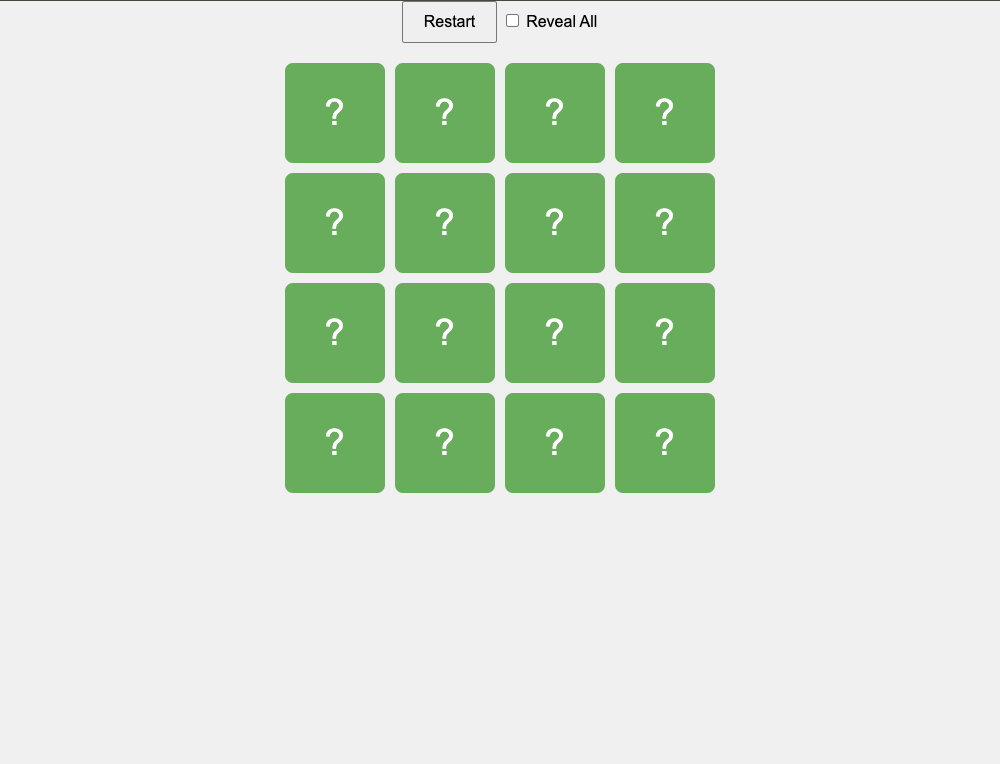
- Create a Grid Layout: Use CSS to style the game board as a grid with 4 rows and 4 columns. Define styles for the cards, including their size, background color, and how they should look when flipped.
- Implement 3D Flip Animation: Add CSS transitions to enable a smooth 3D flip effect when the cards are clicked. This will create the effect of the cards flipping over to reveal their hidden content.
Step 3: Implement the Game Logic with JavaScript
- Prepare the Card Data: Define an array of 8 unique letters (or symbols) and duplicate it to create pairs. Shuffle the array to randomize the card positions on the board.
- Generate the Cards Dynamically: Loop through the shuffled array and create card elements for each letter. Each card has two sides: a front (hidden) and a back (revealing the letter when flipped).
- Handle Card Click Events: Add an event listener to detect when a card is clicked. When a card is clicked, flip it to reveal its letter.
- Check for Matching Pairs: Track the first and second cards that are flipped. If the two cards match, leave them flipped and reset the tracking variables. If they do not match, wait a moment, then flip both cards back over and reset the tracking variables.
- Manage the Game Flow: Continue flipping cards and checking for matches until all pairs are found. Optionally, you could add a mechanism to track the number of attempts or the time taken to find all pairs.
Step 4: Test and Refine
- Test the Game: Test the game thoroughly to ensure that all pairs can be matched and that cards flip correctly. Ensure that the game resets correctly after a match or a non-match.
Pure HTML
<!doctype html>
<html lang="en">
  <head>
    <meta charset="UTF-8" />
    <meta name="viewport" content="width=device-width, initial-scale=1.0" />
    <title>Memory Game</title>
    <link rel="stylesheet" href="styles.css" />
  </head>
  <body>
    <div class="controls">
      <button id="restartButton">Restart</button>
      <label> <input type="checkbox" id="revealCheckbox" /> Reveal All </label>
    </div>
    <div class="game-board">
      <!-- Cards will be generated dynamically using JavaScript -->
    </div>
    <script src="script.js"></script>
  </body>
</html>