Memory Game
Solution
Step 1: Structure the HTML
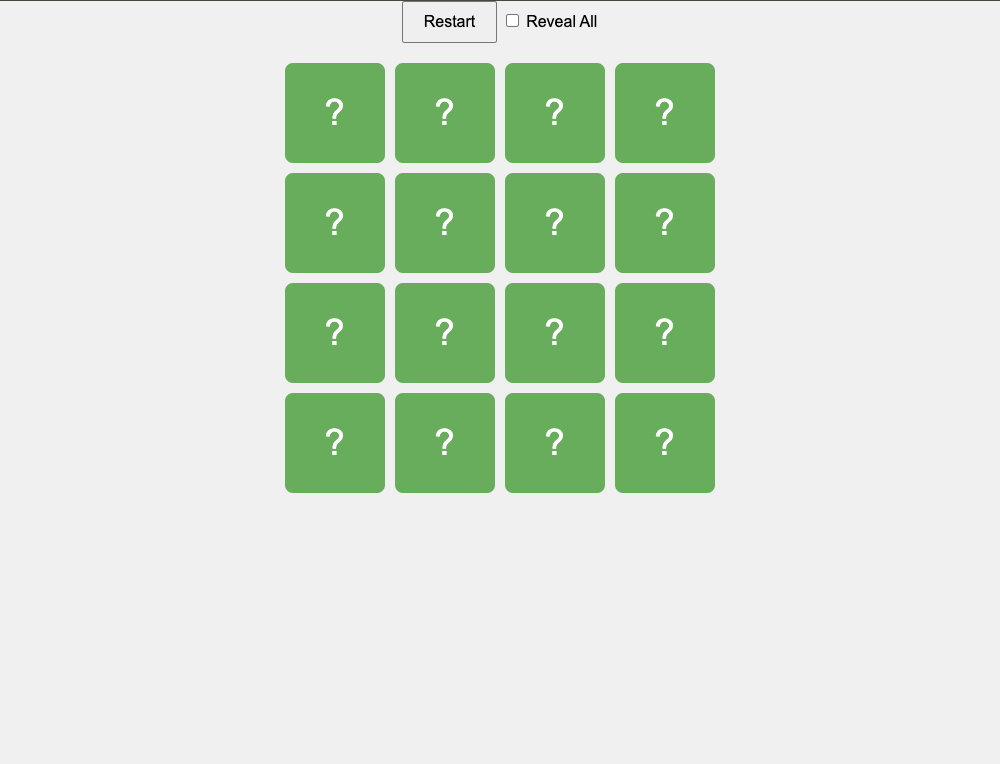
Create a Container: Set up a container that will hold the game board. This container will be used to dynamically generate and display the cards.
Step 2: Style the Game with CSS
- Create a Grid Layout: Use CSS to style the game board as a grid with 4 rows and 4 columns. Define styles for the cards, including their size, background color, and how they should look when flipped.
- Implement 3D Flip Animation: Add CSS transitions to enable a smooth 3D flip effect when the cards are clicked. This will create the effect of the cards flipping over to reveal their hidden content.
Step 3: Implement the Game Logic with JavaScript
- Prepare the Card Data: Define an array of 8 unique letters (or symbols) and duplicate it to create pairs. Shuffle the array to randomize the card positions on the board.
- Generate the Cards Dynamically: Loop through the shuffled array and create card elements for each letter. Each card has two sides: a front (hidden) and a back (revealing the letter when flipped).
- Handle Card Click Events: Add an event listener to detect when a card is clicked. When a card is clicked, flip it to reveal its letter.
- Check for Matching Pairs: Track the first and second cards that are flipped. If the two cards match, leave them flipped and reset the tracking variables. If they do not match, wait a moment, then flip both cards back over and reset the tracking variables.
- Manage the Game Flow: Continue flipping cards and checking for matches until all pairs are found. Optionally, you could add a mechanism to track the number of attempts or the time taken to find all pairs.
Step 4: Test and Refine
- Test the Game: Test the game thoroughly to ensure that all pairs can be matched and that cards flip correctly. Ensure that the game resets correctly after a match or a non-match.
tsc script.ts
Pure HTML
// script.ts

document.addEventListener("DOMContentLoaded", () => {
  const letters: string[] = ["A", "B", "C", "D", "E", "F", "G", "H"];
  let cards: string[] = [];
  const gameBoard = document.querySelector(".game-board") as HTMLElement;
  const restartButton = document.getElementById(
    "restartButton",
  ) as HTMLButtonElement;
  const revealCheckbox = document.getElementById(
    "revealCheckbox",
  ) as HTMLInputElement;

  let firstCard: HTMLElement | null = null;
  let secondCard: HTMLElement | null = null;
  let isChecking: boolean = false;
  let matchedPairs: number = 0;

  // Initialize the game
  function initGame(): void {
    gameBoard.innerHTML = "";
    cards = [...letters, ...letters];
    cards.sort(() => 0.5 - Math.random());

    cards.forEach((letter) => {
      const cardElement = document.createElement("div");
      cardElement.classList.add("card");
      cardElement.innerHTML = `
                <div class="card-inner">
                    <div class="card-front">?</div>
                    <div class="card-back">${letter}</div>
                </div>
            `;
      cardElement.dataset.letter = letter;
      gameBoard.appendChild(cardElement);
    });

    firstCard = null;
    secondCard = null;
    isChecking = false;
    matchedPairs = 0;
    revealCheckbox.checked = false;
    updateButtonText();
  }

  // Handle card click event
  gameBoard.addEventListener("click", (event: MouseEvent) => {
    const clickedCard = (event.target as HTMLElement).closest(
      ".card",
    ) as HTMLElement;

    if (
      clickedCard &&
      !clickedCard.classList.contains("flipped") &&
      !isChecking
    ) {
      clickedCard.classList.add("flipped");

      if (!firstCard) {
        firstCard = clickedCard;
      } else {
        secondCard = clickedCard;
        isChecking = true;

        if (firstCard.dataset.letter === secondCard.dataset.letter) {
          matchedPairs++;
          firstCard = null;
          secondCard = null;
          isChecking = false;

          if (matchedPairs === letters.length) {
            restartButton.textContent = "Play Again";
          }
        } else {
          setTimeout(() => {
            firstCard!.classList.remove("flipped");
            secondCard!.classList.remove("flipped");
            firstCard = null;
            secondCard = null;
            isChecking = false;
          }, 1000);
        }
      }
    }
  });

  // Restart the game
  restartButton.addEventListener("click", () => {
    initGame();
  });

  // Reveal all cards when checkbox is checked
  revealCheckbox.addEventListener("change", () => {
    const allCards = document.querySelectorAll(".card");
    if (revealCheckbox.checked) {
      allCards.forEach((card) => card.classList.add("flipped"));
      restartButton.textContent = "Play Again";
    } else {
      allCards.forEach((card) => card.classList.remove("flipped"));
      updateButtonText();
    }
  });

  // Update the button text based on the game state
  function updateButtonText(): void {
    if (revealCheckbox.checked || matchedPairs === letters.length) {
      restartButton.textContent = "Play Again";
    } else {
      restartButton.textContent = "Restart";
    }
  }

  // Initialize the game on page load
  initGame();
});