Auth with JWT + 2FA
Requirements
Functional Requirements:
User Authentication:
- The system must support user registration, login, and logout.
- Support for two-factor authentication (2FA) to enhance security.
Authorization and Access Control:
- The system must support different user access levels.
- Validation of JWT tokens with each request to secure resources.
Session Management:
- Ability to create, store, and manage sessions for authorized users.
- Support for refresh tokens to extend JWT validity without re-login.
Scalability:
- The system must support up to 100 million users with millions of requests per day.
- Support for horizontal scaling using JWT and distributed architecture.
Security:
- Protection against CSRF and XSS attacks.
- Data encryption and use of secure communication channels (HTTPS).
- Limitation of JWT and refresh tokens' lifespan.
Non-Functional Requirements:
Performance:
- Server response time for authentication requests should not exceed 200 ms.
- The system must handle peak loads of 10,000 requests per second.
Availability:
- The system should be available 99.9% of the time (SLA).
- Support for fault tolerance through the use of backup servers and distributed databases.
Scalability:
- The system must support horizontal scaling to accommodate a growing number of users.
- Ability to dynamically add servers without system downtime.
Manageability:
- Ease of monitoring and debugging requests.
- Logging of all actions related to authentication and authorization.
Load Estimation for 100 Million Users
For a system with 100 million users and assuming each user makes 10 requests per day:
- Total number of requests per day: 1 billion requests.
Peak Load: If 10% of users make requests within one hour, the peak load would be:
- 10 million users * 10 requests = 100 million requests per hour.
- 100 million / 3600 seconds = approximately 27,778 requests per second.
Session Storage (without JWT):
- Each session object occupies, for example, 1 KB.
- 100 million active sessions = 100 GB.
JWT:
- The length of a JWT can be around 1 KB, and storing 1 billion tokens per day would take up around 1 TB of data.
Theoretical Part: Evolution of Authorization Systems to JWT
- HTTP Stateless:
HTTP is a stateless protocol, meaning the server does not store information about previous requests. Each request contains all the necessary information for its processing.
Advantages:
- Simplicity: No need to store state on the server.
- Scalability: Each request is handled independently, making it easier to distribute load among servers.
Disadvantages:
- Need to send data with every request: The user has to authenticate each time.
- Complexity of state management: It is impossible to maintain context between requests.
- Sessions: Making HTTP Stateful
Sessions allow the server to retain information about the user between requests.
How it works:
- Authentication: The user submits their credentials.
- Session Creation: The server creates a unique Session ID associated with the user.
- Session Usage: The client sends the Session ID with each request, and the server retrieves user information from it.
Advantages:
- Security: The user can perform actions without re-entering credentials.
- Control: The server can terminate or invalidate the session if needed.
Disadvantages:
- Server Load: The need to store sessions and perform continuous checks increases the load.
- Scalability: In distributed systems, access to sessions must be maintained across all servers.
- Using a Load Balancer:
In systems with a load balancer, it is important to maintain session affinity to the server where the session was created.
Solutions:
- Sticky Sessions: The load balancer redirects all requests from one user to the same server.
- Session Storage: Use Redis or Memcached to store sessions and access them from different servers.
Advantages:
- Flexibility: Ability to distribute load across servers.
- Fault Tolerance: Session storage is accessible from any server.
Disadvantages:
- Infrastructure Dependence: Requires additional setup and monitoring.
- JSON Web Tokens (JWT): A Decentralized Approach
JWT addresses the problem of session storage by transferring the responsibility for storing and transmitting the state to the client.
How it works:
- Token Creation: The server creates a signed token containing user information.
- Token Storage: The token is stored on the client side and sent with each request.
- Token Verification: The server checks the JWT signature to ensure its authenticity.
Advantages:
- Scalability: No need for centralized session storage.
- Convenience: The token can be used across different microservices and systems.
Disadvantages:
- Security: If the token is stolen, an attacker can use it until it expires.
- Size: JWT can contain more data, increasing the amount of transmitted data.
- Conclusion
For a system with 100 million users and high load, using JWT with two-factor authentication is the optimal choice. This ensures the scalability and fault tolerance required for such volumes and enhances security through multi-factor authentication.
Estimations
Description of JWT Structure and Usage Calculations
JWT Structure and Its Components
JSON Web Token (JWT) is a compact, URL-safe token that is used to transfer information between parties. A JWT consists of three parts:
-
Header:
- Contains information about the type of token and the encryption algorithm.
- Example:
{"alg": "HS256", "typ": "JWT"}.
-
Payload:
- Contains claims that describe the user or other data. Claims can be public, registered, or private.
- Example:
{"name": "Alex", "email": "no-reply@bytebytego.com", "exp": "1234567890"}.
-
Signature:
- Created by encrypting the header and payload using a secret key or a private key in the case of asymmetric encryption.
- Example:
HMACSHA256(base64UrlEncode(header) + "." + base64UrlEncode(payload), secret).
A JWT appears as a string composed of three parts separated by dots, such as: eyJhbGciOiJIUzI1NiIsInR5cCI6IkpXVCJ9.eyJuYW1lIjoiQWxleCIsImVtYWlsIjoibm8tcmVwbHlAYnl0ZWJ5dGVnby5jb20iLCJleHAiOjEyMzQ1Njc4OTB9.SflKxwRJSMeKKF2QT4fwpMeJf36POk6yJV_adQssw5c.
eyJhbGciOiJIUzI1NiIsInR5cCI6IkpXVCJ9
.eyJuYW1lIjoiQWxleCIsImVtYWlsIjoibm8tcmVwbHlAYnl0ZWJ5dGVnby5jb20iLCJleHAiOiIxMjM0NTY3ODkwIn0
.SflKxwRJSMeKKF2QT4fwpMeJf36POk6yJV_adQssw5c
Types of Claims in JWT
There are three types of claims that can be included in a JWT:
-
Public Claims:
- Claims that can be publicly accessible, such as username or ID.
-
Registered Claims:
- Reserved claims like
iss(issuer),exp(expiration time),sub(subject), and others. These are intended to standardize data processing.
- Reserved claims like
-
Private Claims:
- Claims defined by developers to convey specific information between the client and server.
JWT: Symmetric and Asymmetric Encryption
-
Symmetric Encryption:
- The same key is used for both signing and verifying the token.
- Example: HMAC using SHA-256.
-
Asymmetric Encryption:
- The private key is used for signing, and the public key is used for verifying the signature.
- Example: RSA.
Using JWT in the System
-
Authorization:
- JWT is sent in the
Authorizationheader with the typeBearer. The server checks the token for authenticity and expiration.
- JWT is sent in the
-
Storage:
- JWT is usually stored in
LocalStorageorCookieon the client side.
- JWT is usually stored in
-
Token Refresh (Refresh Tokens):
- A long-lived token allows the client to obtain new JWTs without re-authentication.
Estimating JWT Usage for 100 Million Users
To calculate the data volumes when using JWT, consider the following parameters:
-
JWT Size:
- Header and signature occupy 512 bytes each.
- Payload is 1 KB.
- Total token size: 2 KB.
-
Active Users:
- Suppose 10% of users, i.e., 10 million, are active simultaneously.
- Each user makes 10 requests per day: 100 million requests per day.
-
Token Storage:
- If tokens are generated for each request and not reused, 100 million tokens would occupy:
100 million tokens * 2 KB = 200 GB of data per day.
- With token reuse (refresh tokens), the volume can be significantly reduced.
- If tokens are generated for each request and not reused, 100 million tokens would occupy:
-
Throughput:
- If peak load is 27,778 requests per second:
- Peak traffic =
27,778 * 2 KB = 54.5 MB/sec. - The system must be capable of handling such data volumes without delays.
- Peak traffic =
- If peak load is 27,778 requests per second:
Conclusion: Why JWT?
JWT has several advantages over traditional sessions:
- Scalability: JWT does not require centralized session storage, simplifying horizontal scaling.
- Security: JWT signatures ensure that the data within the token has not been altered.
- Ease of Integration: The token can be used across all microservices in the system without additional checks.
- Performance: JWT avoids constant database calls for session validation, reducing server load.
JWT is well-suited for modern distributed systems where minimizing dependence on a central store and maintaining high performance and security is crucial.
Storage Schema
Storage Schema for a System with JWT and Two-Factor Authentication
To support the authentication process described above and ensure proper system operation, we need to design a data storage structure. The database should store information about users, temporary data for two-factor authentication (2FA), and possibly information about refresh tokens. Let's consider a storage schema that includes the following tables:
Users Table
This table will store basic information about users.
CREATE TABLE Users (
    user_id BIGINT PRIMARY KEY AUTO_INCREMENT,
    username VARCHAR(255) UNIQUE NOT NULL,
    password_hash VARCHAR(255) NOT NULL,
    email VARCHAR(255) UNIQUE NOT NULL,
    phone_number VARCHAR(20),
    created_at TIMESTAMP DEFAULT CURRENT_TIMESTAMP,
    updated_at TIMESTAMP DEFAULT CURRENT_TIMESTAMP ON UPDATE CURRENT_TIMESTAMP
);
- user_id: Unique identifier for the user.
- username: Unique username.
- password_hash: Hashed user password.
- email: User's email address.
- phone_number: Phone number for 2FA.
- created_at: Account creation date.
- updated_at: Date of the last account update.
2FA Sessions Table
This table will store temporary sessions for verifying the 2FA code.
CREATE TABLE 2FA_Sessions (
    session_id BIGINT PRIMARY KEY AUTO_INCREMENT,
    user_id BIGINT NOT NULL,
    short_jwt VARCHAR(512) NOT NULL,
    expiration_time TIMESTAMP NOT NULL,
    is_valid BOOLEAN DEFAULT TRUE,
    FOREIGN KEY (user_id) REFERENCES Users(user_id) ON DELETE CASCADE
);
- session_id: Unique identifier for the 2FA session.
- user_id: Identifier of the user associated with this session.
- short_jwt: Short-lived JWT issued after the first step of authentication.
- expiration_time: Expiration time of the short-lived JWT.
- is_valid: Flag indicating whether the session is valid.
Refresh Tokens Table
This table will store information about refresh tokens if they are used.
CREATE TABLE Refresh_Tokens (
    token_id BIGINT PRIMARY KEY AUTO_INCREMENT,
    user_id BIGINT NOT NULL,
    refresh_token VARCHAR(512) NOT NULL,
    expiration_time TIMESTAMP NOT NULL,
    is_valid BOOLEAN DEFAULT TRUE,
    created_at TIMESTAMP DEFAULT CURRENT_TIMESTAMP,
    FOREIGN KEY (user_id) REFERENCES Users(user_id) ON DELETE CASCADE
);
- token_id: Unique identifier for the refresh token.
- user_id: Identifier of the user associated with this refresh token.
- refresh_token: Stores the actual refresh token.
- expiration_time: Expiration time of the refresh token.
- is_valid: Flag indicating whether the refresh token is valid.
- created_at: Time when the refresh token was created.
Activity Logs Table
This table will store logs of all operations related to authentication.
CREATE TABLE Activity_Logs (
    log_id BIGINT PRIMARY KEY AUTO_INCREMENT,
    user_id BIGINT NOT NULL,
    activity_type VARCHAR(255) NOT NULL,
    activity_time TIMESTAMP DEFAULT CURRENT_TIMESTAMP,
    description TEXT,
    FOREIGN KEY (user_id) REFERENCES Users(user_id) ON DELETE CASCADE
);
- log_id: Unique identifier for the log entry.
- user_id: Identifier of the user to whom the log entry pertains.
- activity_type: Type of activity (e.g., login, logout, 2FA verification).
- activity_time: Timestamp of the event.
- description: Description of the activity.
Workflow Interaction with Tables
Login:
- The
Userstable is checked to confirm credentials. - If successful, a short-lived JWT is created and recorded in the
2FA_Sessionstable. - The short-lived JWT is sent to the user.
2FA Verification:
- The user sends the short-lived JWT and 2FA code.
- The server checks whether a corresponding record exists in
2FA_Sessionsand whether it is still valid. - If verification is successful, a long-lived JWT is created.
API Usage:
- For each request to a protected API, the server checks the long-lived JWT. If a refresh token is used, its validity is checked against the
Refresh_Tokenstable.
Token Renewal:
- If the long-lived JWT has expired, the user sends a refresh token.
- The server checks the refresh token, and if valid, issues a new JWT.
Logging:
- All operations are recorded in the
Activity_Logstable for later analysis and auditing.
Conclusion
This data storage schema ensures secure and scalable authentication management in a system using JWT and two-factor authentication. It allows for the support of a large volume of users, efficient token renewal, and logging of all significant events.
High-level Design
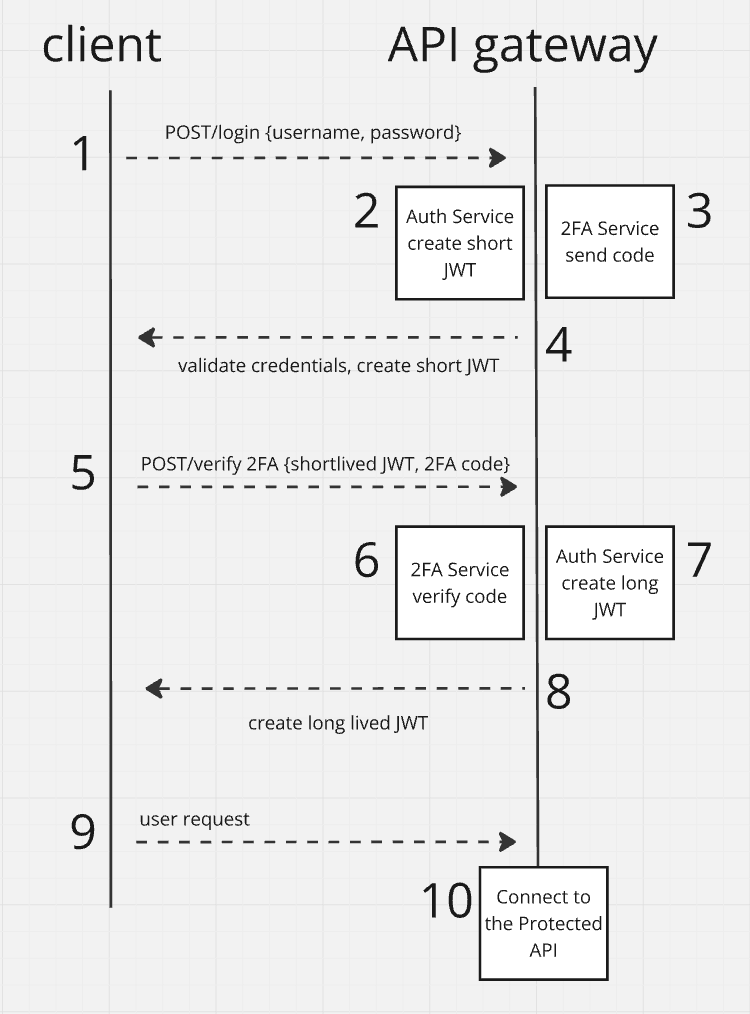
Step-by-Step Comments:
-
POST /login (username, password) (Client -> API Gateway):
- The client sends an authentication request with the username and password. This request is routed through the API Gateway to the Auth Service for credential validation.
-
Auth Service: Validate credentials, create short-lived JWT (API Gateway -> Auth Service):
- The Auth Service receives the authentication request and validates the username and password. Upon successful validation, a short-lived JWT is created, which will be used for subsequent 2FA verification.
-
2FA Service: Send 2FA code (Auth Service -> 2FA Service):
- After creating the short-lived JWT, the Auth Service interacts with the 2FA Service to send a one-time authentication code (e.g., via SMS, Email, or an app).
-
Return Short-lived JWT (API Gateway -> Client):
- The Auth Service returns the short-lived JWT to the client through the API Gateway. This token is valid for a limited time and is intended for the next step of authentication (2FA).
-
POST /verify-2FA (short-lived JWT, 2FA code) (Client -> API Gateway):
- The client enters the 2FA code received from the 2FA Service and submits it along with the short-lived JWT to the server via the API Gateway for verification.
-
2FA Service: Verify 2FA code (API Gateway -> 2FA Service):
- The 2FA Service verifies the validity of the submitted 2FA code. If the code is correct, the 2FA Service communicates this to the Auth Service.
-
Auth Service: Create long-lived JWT (2FA Service -> Auth Service):
- Upon successful 2FA code verification, the Auth Service generates a long-lived JWT, which will be used to authorize the user within the system.
-
Return Long-lived JWT (API Gateway -> Client):
- The Auth Service sends the long-lived JWT back to the client through the API Gateway. This token will be used by the client to access protected APIs for the duration of its validity.
-
User Request with Long-lived JWT (Client -> API Gateway):
- The client uses the long-lived JWT to make requests to protected APIs. This token verifies the user's identity and their access rights.
-
Connect to the Protected API (API Gateway -> Protected API):
- The API Gateway checks the JWT, and if it is valid, forwards the request to the protected resources (Protected API), which provide the client access to the required data or functions.
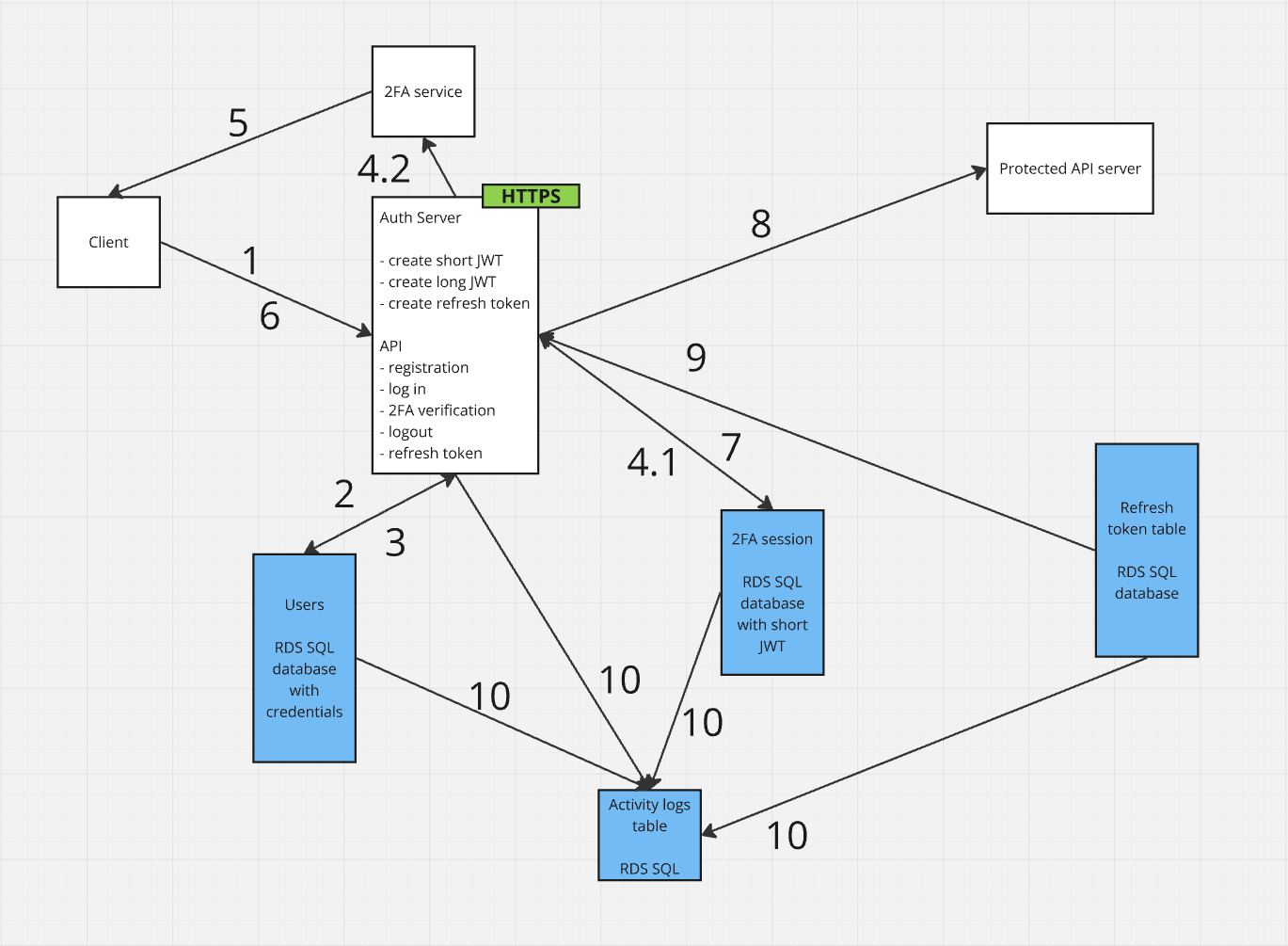
Step Verification:
-
Client -> Auth Server (Login Request):
- The client sends a login request with username and password to the Auth Server.
-
Auth Server -> Users Table (Validate Credentials):
- The Auth Server checks the credentials by querying the
Userstable in the database.
- The Auth Server checks the credentials by querying the
-
Users Table -> Auth Server (Credentials Valid):
- The
Userstable returns the result of the credential validation (successful or not).
- The
-
Auth Server -> 2FA Service (Send 2FA Code):
- The Auth Server interacts with the 2FA Service by sending a request to generate and send a 2FA code to the user.
-
Auth Server -> 2FA Sessions Table (Store short-lived JWT):
- The Auth Server stores the short-lived JWT in the
2FA_Sessionstable for later verification.
- The Auth Server stores the short-lived JWT in the
-
2FA Service -> Client (Send 2FA Code):
- The 2FA Service sends the two-factor authentication code to the user's device (via SMS, email, or app).
-
Client -> Auth Server (Send 2FA Code and short-lived JWT):
- The client sends the short-lived JWT and the 2FA code to the Auth Server for validation.
-
Auth Server -> 2FA Sessions Table (Verify 2FA and JWT):
- The Auth Server checks the validity of the 2FA code and the short-lived JWT by querying the
2FA_Sessionstable.
- The Auth Server checks the validity of the 2FA code and the short-lived JWT by querying the
-
Auth Server -> API Server (Send long-lived JWT):
- The Auth Server creates a long-lived JWT and sends it to the client for access to protected APIs.
-
Auth Server -> Activity Logs Table (Log Activity):
- All actions related to authentication and token creation are logged in the
Activity_Logstable for auditing purposes.
- All actions related to authentication and token creation are logged in the
-
API Server -> Refresh Tokens Table (Check Refresh Token):
- If the JWT has expired, the API Server checks the validity of the refresh token by querying the
Refresh_Tokenstable.
- If the JWT has expired, the API Server checks the validity of the refresh token by querying the
Why HTTPS Should Be Used
1. Data Encryption
-
Data Security:
- HTTPS (Hypertext Transfer Protocol Secure) ensures that all data transmitted between the client and the server is encrypted. This encryption prevents attackers from intercepting and reading the data (e.g., man-in-the-middle attacks).
-
JWT Token Protection:
- JWT tokens can contain sensitive information in the payload, such as the user ID, roles, and more. If a token is intercepted in an unencrypted form (over HTTP), an attacker could use it to access protected resources.
2. Server Authentication
- SSL/TLS Certificates:
- HTTPS uses SSL/TLS certificates to verify the authenticity of the server to which the client is connecting. This protects against attacks where an attacker could pose as a legitimate server (phishing).
3. Integration with Browsers and Clients
-
Browser Security Indicators:
- Most modern browsers mark sites that use HTTP as "not secure," which can deter users and damage trust in your service. Some browsers may even block access to such sites entirely.
-
API Client Requirements:
- Some API clients may require HTTPS by default to work with them.
How HTTPS Works
When a client sends a request to the server over HTTPS:
-
Connection Establishment:
- The client (e.g., a web browser) initiates a connection to the server using HTTPS.
- The server responds by sending its SSL/TLS certificate to the client.
-
Certificate Verification:
- The client verifies the authenticity of the certificate, ensuring it was issued by a trusted certificate authority (CA) and matches the server's domain.
-
Secure Channel Establishment:
- After successful certificate verification, the client and server exchange encryption keys using asymmetric encryption and establish a symmetric key for further data encryption.
-
Data Transmission:
- All subsequent data, including JWT tokens, is transmitted over the encrypted channel, protecting it from interception and modification.
Why Long-Lived JWT Tokens Are Not Stored on the Server
-
Self-Containment and Autonomy:
- A JWT token includes a payload that contains encoded data about the user, such as the user ID, access rights, and token expiration time. This makes the JWT self-contained— the server can validate the token based on its signature without needing to query a database.
-
Signature and Verification:
- JWT tokens are signed with a secret key (in the case of symmetric encryption) or a private/public key pair (in the case of asymmetric encryption). This signature allows the server to verify the authenticity of the token and ensure that the data within the token has not been tampered with.
-
Client-Side Storage:
- JWT tokens are typically stored on the client side, such as in
LocalStorageor cookies. When the client sends a request to a protected API, it includes the token in theAuthorizationheader (Authorization: Bearer <JWT>). The server can then validate the token without needing to store it.
- JWT tokens are typically stored on the client side, such as in
-
Scalability and Fault Tolerance:
- One of the main advantages of JWT tokens is that they eliminate the need to store session state on the server. This simplifies scaling because any node in the system can verify the JWT without needing to access a centralized session store.
-
Reduced Server Load:
- Storing sessions or tokens on the server requires additional resources and database operations. JWTs reduce this load because the server only needs to verify the token's signature, which is much faster than reading from a database.
Exception — Refresh Tokens
- Unlike long-lived JWT tokens, refresh tokens are typically stored on the server. This is necessary so the server can control their lifecycle, revoke them when needed, and issue new JWTs as old ones expire.
API Design
User registration
Endpoint: POST /v1/register
{
  "username": "example_user",
  "password": "secure_password",
  "email": "user@example.com",
  "phone_number": "+1234567890"
}
User login
Endpoint: POST /v1/login
{
  "username": "example_user",
  "password": "secure_password"
}
2FA (2FA Verification)
Endpoint: POST /v1/verify-2fa
{
  "short_jwt": "eyJhbGciOiJIUzI1NiIsInR5cCI6IkpXVCJ9...",
  "2fa_code": "123456"
}
API (Access Protected API)
Endpoint: GET /v1/protected-resource
Authorization: Bearer <long_jwt>
Token Refresh
Endpoint: POST /v1/token/refresh
{
  "refresh_token": "dXNlcmlkOnBhc3N3b3Jk"
}
Logout
Endpoint: POST /v1/logout
{
  "refresh_token": "dXNlcmlkOnBhc3N3b3Jk"
}
Detailed design
1. Data Validation
Data validation should occur at all levels, starting from the client side and continuing to the server.
-
On the Client Side:
- Validate email format, password length, and other fields before submitting data to the server.
- Use regular expressions to validate input formats.
-
On the Server Side:
- Validate input data at each API endpoint.
- Utilize libraries for data validation, such as Joi (in Node.js) or class-validator (in NestJS).
- Validate the presence and correct format of JWT in each protected request.
- Implement rate limiting to protect against brute-force attacks.
2. Encryption and Security
Security is a critical aspect in authentication and authorization systems.
-
Password Storage:
- Passwords should be stored as hashes, using algorithms like bcrypt. Apply sufficient salting to protect against dictionary attacks.
-
JWT Encryption:
- JWT tokens should be signed using robust algorithms like HS256 (symmetric encryption) or RS256 (asymmetric encryption).
- If using RS256, store the private key securely, such as in AWS Secrets Manager or Azure Key Vault.
-
Secure Storage of JWT on the Client:
- JWT tokens stored on the client side should be protected from XSS attacks. For instance, if using localStorage, ensure your web application is not vulnerable to XSS.
- Ideally, use HttpOnly cookies to store tokens.
-
JWT Expiration and Refreshing:
- Set reasonable expiration times for tokens (e.g., 1 hour for long-lived JWT and 5-10 minutes for short-lived JWT).
- Implement a mechanism for automatic token refreshing (refresh tokens) and revoking tokens when necessary.
3. Scalability and Fault Tolerance
Scalability and fault tolerance are essential for a robust authentication system.
-
API Gateway:
- The API Gateway should support routing requests to the appropriate services (Auth Service, 2FA Service, Protected API). Consider using AWS API Gateway or NGINX for traffic management.
-
Load Balancing:
- Use a load balancer (e.g., AWS ELB, NGINX) to distribute traffic across multiple server instances (Auth Service, API Server).
-
Decentralization and Caching:
- Use distributed databases for storing users, sessions, and tokens (e.g., AWS RDS, PostgreSQL).
- Implement caching to reduce the load on databases, using Redis or Memcached for caching JWTs and sessions.
-
Microservices Architecture:
- Split functional components into microservices (Auth Service, 2FA Service, Protected API) to simplify scaling and management.
4. Logging and Monitoring
Logging and monitoring are crucial for maintaining system health and security.
-
Logging:
- Log all authentication-related operations in a centralized logging system, such as ELK Stack or AWS CloudWatch.
- Record all login attempts, authorization errors, access attempts to protected resources, and any anomalies.
-
Monitoring:
- Implement monitoring to track system health and performance, using tools like Prometheus and Grafana.
- Set up alerts for suspicious activity or a sharp increase in errors (e.g., exceeding the allowed number of failed login attempts).
-
Analytics:
- Implement user activity data collection and analysis to detect anomalous patterns and potential security threats.
5. Failover and Backup
Failover and backup strategies are necessary to ensure high availability and data integrity.
-
Data Backups:
- Regularly back up databases (e.g., AWS RDS Backup) with the ability to quickly restore data in the event of a failure.
-
Failover:
- Configure automatic failover to standby instances in case of a primary server or database failure. Use Multi-AZ deployments for high availability.
6. Access Control and Roles Management
Access control and role management ensure that users have appropriate permissions within the system.
-
Roles and Permissions:
- Implement a role-based access control (RBAC) system, where each user is assigned one or more roles that define their permissions in the system.
-
Protected API:
- Ensure that each API endpoint checks the user's JWT and access rights before processing the request.
7. Security Protections
Implement protections against common security threats.
-
CSRF Protection:
- If using JWT in cookies, ensure your requests are protected against CSRF attacks by using CSRF tokens.
-
DDoS Protection:
- Use DDoS protection services like AWS Shield to protect your API Gateway and servers from network and application-level attacks.
-
Protection against XSS and SQL Injection:
- Protect against XSS by sanitizing input data and implementing a Content Security Policy (CSP).
- Use ORM libraries or parameterized queries to protect against SQL injection attacks.
Evaluation
Fulfillment of Requirements
Functional Requirements:
- Security and Authentication:
- The system meets security requirements by implementing two-factor authentication (2FA), session management, and the creation and validation of JWT tokens.
- Core operations such as user registration, login, 2FA verification, access to protected APIs, token renewal, and logout are supported.
Non-Functional Requirements:
- Scalability and Fault Tolerance:
- Scalability and fault tolerance are ensured through the use of a microservices architecture, load balancers, and distributed databases.
- Logging and monitoring of all operations allow for system activity tracking and reliability assurance.
Security and Compliance
-
JWT Tokens:
- Long-lived JWT tokens are not stored on the server, minimizing the risk of compromise and simplifying scaling.
- The use of two-factor authentication provides an additional layer of protection, reducing the likelihood of unauthorized access.
- The application of HMAC and RSA for signing JWT tokens ensures their integrity and authenticity.
-
Access Control:
- A flexible role-based access control (RBAC) system is implemented, ensuring proper access distribution to protected resources.
Scalability and Fault Tolerance
-
Scalability:
- The system architecture supports horizontal scaling through the use of microservices and distributed databases (RDS).
- Load balancers and caching with Redis or Memcached reduce the load on servers and databases, ensuring high performance as the number of users increases.
-
Fault Tolerance:
- The use of database replication and failover mechanisms ensures high data availability and recovery in case of failures.
- Logging all operations and monitoring the system's state enables the prompt identification and resolution of issues.
Trade-Offs
-
Consistency:
- The system prioritizes availability and scalability, which might lead to less strict consistency in some cases, such as token validation across different nodes.
- Since JWT is self-contained, it doesn't require constant database access, which enhances performance but reduces control over their state.
-
Token Storage:
- Long-lived JWT tokens are stored on the client side, which reduces server load but requires additional security measures on the client side to protect against XSS and CSRF attacks.
Reliability
-
Logging and Monitoring:
- The system provides detailed logging and monitoring of all authentication and authorization operations. This not only allows tracking of activity but also enables rapid response to potential security threats.
-
Backup:
- Regular backups of databases and server configurations ensure reliable recovery in case of failures.
Future Scalability
- Horizontal Scaling:
- The system is designed with the potential to increase the number of users. In the future, new servers and load balancers can be added easily without altering the application logic.
- The use of asynchronous queues and distributed handlers (e.g., Kafka) can be added to handle more complex scaling scenarios.
Multi-Provider Corporate Email Authentication System
Overview
This system will support authentication using corporate email accounts from various providers (Google Workspace, Microsoft 365, and others) while tracking user login activity, including timestamps and device information.
Authentication Flow
- User attempts to log in using their corporate email account.
- The system identifies the email provider based on the domain.
- The user is redirected to the appropriate OAuth flow for their email provider.
- Upon successful authentication, the system verifies that the email domain is in the list of approved corporate domains.
- If verified, the system creates a JWT token and logs the login activity.
Data Schema
We'll modify our schema to accommodate multiple email providers and corporate domains:
CREATE TABLE Users (
    user_id BIGINT PRIMARY KEY AUTO_INCREMENT,
    email VARCHAR(255) UNIQUE NOT NULL,
    provider_id VARCHAR(255) NOT NULL,
    created_at TIMESTAMP DEFAULT CURRENT_TIMESTAMP,
    updated_at TIMESTAMP DEFAULT CURRENT_TIMESTAMP ON UPDATE CURRENT_TIMESTAMP
);

CREATE TABLE Email_Providers (
    provider_id VARCHAR(50) PRIMARY KEY,
    provider_name VARCHAR(100) NOT NULL,
    oauth_config JSON NOT NULL
);

CREATE TABLE Approved_Domains (
    domain VARCHAR(255) PRIMARY KEY,
    provider_id VARCHAR(50),
    FOREIGN KEY (provider_id) REFERENCES Email_Providers(provider_id)
);

CREATE TABLE User_Activity (
    activity_id BIGINT PRIMARY KEY AUTO_INCREMENT,
    user_id BIGINT NOT NULL,
    login_time TIMESTAMP DEFAULT CURRENT_TIMESTAMP,
    device_info TEXT,
    ip_address VARCHAR(45),
    FOREIGN KEY (user_id) REFERENCES Users(user_id) ON DELETE CASCADE
);
Implementation Details
-
Multi-Provider OAuth Integration:
- Implement OAuth 2.0 flows for multiple providers (Google, Microsoft, etc.).
- Store OAuth configuration for each provider in the
Email_Providerstable.
-
Domain Verification:
- After successful OAuth authentication, verify that the email domain is in the
Approved_Domainstable.
- After successful OAuth authentication, verify that the email domain is in the
-
JWT Token Generation:
- Generate a JWT token upon successful authentication, as in the original system.
-
Activity Logging:
- Log each successful login in the
User_Activitytable, including device and IP information.
- Log each successful login in the
-
API Endpoints:
/login: Initiates the login process, detecting the appropriate provider./oauth/callback: Handles OAuth callbacks from various providers./activity: Retrieves user login history.
Provider-Specific Considerations
-
Google Workspace:
- Use Google OAuth 2.0 for authentication.
- Verify HD (hosted domain) claim in the ID token.
-
Microsoft 365:
- Use Microsoft Azure AD for authentication.
- Verify the
tid(tenant ID) claim in the ID token.
-
Other Providers:
- Implement custom OAuth flows as needed.
- Ensure proper domain verification for each provider.
Security Considerations
- Maintain a strict whitelist of approved email domains in the
Approved_Domainstable. - Implement rate limiting on authentication attempts.
- Regularly update OAuth configurations and rotate client secrets.
- Use HTTPS for all communications.
- Encrypt sensitive information in the
device_infofield.
Scalability
- Use a microservices architecture to separate authentication logic for different providers.
- Implement caching (e.g., Redis) for frequently accessed data like approved domains.
- Consider using a distributed database for the
User_Activitytable to handle high write loads.
Интеграция RBAC и поддержка множества почтовых провайдеров
Добавление RBAC в систему
Для интеграции RBAC в существующую систему аутентификации, нам нужно добавить следующие компоненты:
- Таблица для ролей:
CREATE TABLE Roles (
    role_id INT PRIMARY KEY,
    role_name VARCHAR(50) UNIQUE NOT NULL
);
- Таблица для связи пользователей и ролей:
CREATE TABLE User_Roles (
    user_id BIGINT,
    role_id INT,
    FOREIGN KEY (user_id) REFERENCES Users(user_id),
    FOREIGN KEY (role_id) REFERENCES Roles(role_id),
    PRIMARY KEY (user_id, role_id)
);
- Модификация таблицы Users:
ALTER TABLE Users ADD COLUMN default_role_id INT;
Процесс проверки роли
Проверка роли пользователя должна происходить после успешной аутентификации, но до предоставления доступа к защищенным ресурсам. В контексте данной схемы, это должно происходить на этапе создания долгосрочного JWT токена (long JWT) в Auth Server.
- После успешной аутентификации и 2FA верификации, Auth Server запрашивает роли пользователя из таблицы User_Roles.
- Полученные роли включаются в payload долгосрочного JWT токена.
- При обращении к Protected API Server, сервер проверяет роли, указанные в JWT токене, и на их основе принимает решение о предоставлении доступа к конкретным ресурсам или операциям.
Таблицы для поддержки нескольких почтовых провайдеров
Напомню, что для поддержки нескольких почтовых провайдеров мы добавили следующие таблицы:
- Таблица провайдеров электронной почты:
CREATE TABLE Email_Providers (
    provider_id VARCHAR(50) PRIMARY KEY,
    provider_name VARCHAR(100) NOT NULL,
    oauth_config JSON NOT NULL
);
- Таблица одобренных доменов:
CREATE TABLE Approved_Domains (
    domain VARCHAR(255) PRIMARY KEY,
    provider_id VARCHAR(50),
    FOREIGN KEY (provider_id) REFERENCES Email_Providers(provider_id)
);
Обновленная схема процесса аутентификации
- Клиент отправляет запрос на аутентификацию с корпоративным email.
- API Gateway определяет провайдера email по домену и перенаправляет на соответствующий OAuth flow.
- После успешной OAuth аутентификации, система проверяет, что домен email находится в списке одобренных (Approved_Domains).
- Auth Server создает короткий JWT и инициирует 2FA.
- После успешной 2FA верификации, Auth Server запрашивает роли пользователя.
- Auth Server создает долгосрочный JWT, включая в него информацию о ролях пользователя.
- При обращении к Protected API Server, сервер проверяет JWT и роли пользователя для принятия решения о доступе.